Cascading Combo Boxes
Filtering the records in one combo box based on the value selected in another.
NEW: See my updated video: Cascading Combo
Q: I have two combo boxes on my form. When the user
selects a value in Combo Box One, I need to filter the list in Combo Box
Two. For example, if the first combo box has a list of States, then I
want Combo Box Two to show only cities from the state chosen in Combo
Box One.
A: I get asked this question
all the time. This is NOT easy to do, but it can be done. You
need to know how to
make a combo box, how to
get a query
critiera from a form field, and how to
create an AfterUpdate event.
Once you've mastered those techniques, you're ready to move on to this
lesson.
Here is a FREE VIDEO TUTORIAL
that will walk you through an example of working with multiple combo
boxes. It's
much easier to show you how it's done than to explain it here.
I teach the concepts in this free mini tutorial in my
Access 307 course. These are
full courses - over 60 minutes in length each. I spend a lot more time going
over how to do this, in addition to lots more tips and tricks.
The updated version of this for Access 2007 - 2019 users can be found in
Access Developer 6.
UPDATE:
NEW: See my updated video: Cascading Combo
A customer has told me she's trying to cascade combo boxes in a SUBFORM.
This adds a bit of complexity to the problem, but it can be done with a slightly
different approach. Here's what I did. I used the same kind of setup, but in the
RowSource for the CityCombo box, I used this SQL statement instead of a
query:
SELECT City FROM CityT WHERE State=[StateCombo];
This removes the need for the query with the parameter. The query works fine
for a single form solution, but when you're dealing with a continuous form or a
SUBFORM, then you have to have each combo box deal with it's own record. In this
case the "State=[StateCombo]" says for each record to look over at the value of
the StateCombo box and fill in that value here for my record list.
But we're not done yet. Now, when you move from record to record, you need to
make sure you update the CityCombo box's list of cities. So you need to put this
in the CityCombo's OnGotFocus event:
CityCombo.Requery
Now this will force the CITY combo box to requery itself whenever you drop
the box down. It will look over at the current State and show you only these
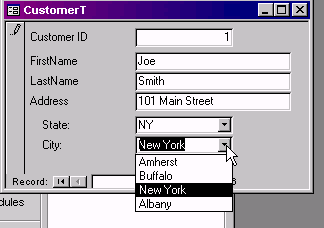
records. Here's what I end up with:

It works PERFECTLY for me, and this solution is completely independent. It
doesn't rely on any queries, nor any fields on the parent form.

By Richard Rost


Click here to sign up for more FREE tips
| 


