599CD.com Access Imaging Seminar Done   Collapse Menus
 
 
NEW Courses - Access Imaging, Excel 2007 Level 5 dismiss


What's New?  |  Courses  |  Theater  |  Demo  |  Tips  |  Blog  |  Forums  |  Search  |  Help  |  Order

 
What do you want to learn today? 
 
 
Courses - Microsoft Access 310
Description: Advanced Access
Running Time: 108 minutes
Pre-Requisites: Access 309 very strongly recommended
Versions:
We use Access XP in this course, but the lessons are valid for all versions of Access from 95 to 2003. There are cosmetic changes in Access 2007. Order before 3/15/2010 to get a FREE upgrade to our 2007 version when released!
 

Access 310 starts off by covering Conditional Formatting, where you can change the format of a field for each record based on the data within the field.
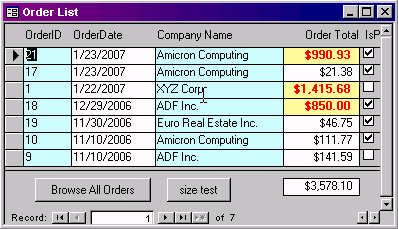
 

Next, we're going to learn how to resize our forms (height and width) using VBA code.

In lesson three, I'm going to teach you how to take your company logo that is on several different forms and reports, and move it into a table. The benefit is that you won't have to duplicate the logo in multiple places if it ever needs to change, and it will save space in your database (images take up a lot of space).
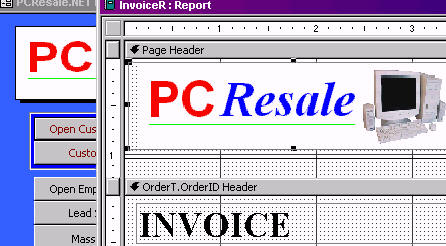
 

We'll also create a Settings table and form for different company settings (name, address, etc.) that we can look up for our forms and reports.


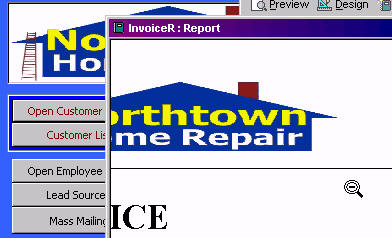
Now we can easily change that logo throughout our database by simply pasting it in our Company Settings form.
 

Next, we'll start tracking Payments for each order. We'll need a payment table and form, and then a button on our order form to show all of the payments for the current order.
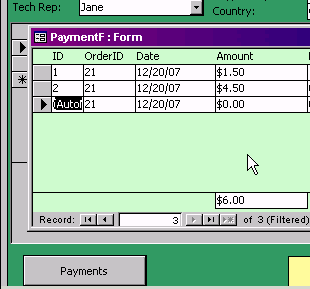
 

This lesson will teach you about the DSUM function to add up all of the values in a different table (like all of the payments for the current order). I'll also show you the Modal and Popup properties for forms so a form stays on top of other forms - and so your users have to close the current form before they can click on anything else behind it.

Next, we'll calculate the amount due on the order, but to do that we'll have to learn how to read the order total off of the subform. This isn't easy to do. I'll show you the correct notation for it. Yes, the grey area below is the subform. Payments is calculated with DSUM, and AmountDue is just math, but it has to read the OrderTotal.


In lesson six, we'll use the MsgBox function to return a yes or no value. We'll do this specifically to warn the user if an invoice is already marked PAID and they try to put a payment on it - an "are you sure" event.

We will do more with If/Then statements and learn more about VBA programming logic. We'll also learn about the BeforeUpdate event which is very similar to AfterUpdate, except BeforeUpdate allows you to do things before the data is written to the table - like cancelling the event!

Next, we'll put the Payments and AmountDue on the Invoice report. We'll put some VBA code in the build event of the section to hide the Payments field and label if there are no payments.
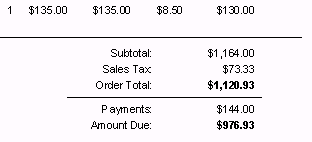
 

We've learned about the CanGrow / CanShrink properties before, but what do you do when you have labels on your form? They can't grow or shrink automatically. I'll show you how to deal with that.

Next, we'll have the database notify us if enough payments have been received on an order to mark it paid - when we close the payments form. Of course, more VBA code in an event.

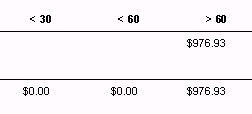
Finally, we'll fix our Accounts Receivable report, because that was built before the database handled payments - we want it to accurately reflect the amount due on an invoice.


ACCESS 310 - Course Outline

0. Introduction - 4:33

1. Conditional Formatting in Forms - 5:05
Changing form field formatting based on data

2. Resizing a Form with VBA - 6:58
Using Visual Basic code to resize forms when they open
Me.InsideHeight, Me.InsideWidth
What are Twips

3. Company Settings Table, Part 1 - 11:23
Moving our company logos from forms/reports into table
Benefits: easily changed, saves space
Creating a company settings table
Locked Property
Inserting a Bound Object Frame in a report
DLOOKUP in a report object control source

4. Company Settings Table, Part 2 - 7:17
Closing one form when another one opens
DoCmd.Close
OnClose Event
When an open record on one form locks another
Using DLOOKUP to get other values from company settings
Changing the form caption property
OnOpen Event for a form
Me.Caption

5. Tracking Payments, Part 1 - 21:31
Payment table and form (PaymentT, PaymentF)
Button on order form to show payments for current order
DoCmd.GoToRecord acNewRec to go to a new record
Using DSUM() to add up all of the payments for an order
How is DSUM different from DLOOKUP
Popup and Modal properties for a form
Refreshing the records on a different form
Forms!OrderF.Refresh and Me.Refresh
Calculating the amount due on an invoice
Accessing a value on a subform
Forms!OrderF!OrderSubform.Form!OrderTotal

6. Tracking Payments, Part 2 - 15:19
Warning users not to make a payment if invoice is PAID
vbExclamation
vbYesNo+vbExclamation
Creating a new value called MyReply in VBA Code
Exit Sub
Option Explicit
Explicitly declaring variables
Using DIM to create your own variables
Adding more logic - don't allow a payment if it's a QUOTE
Using the BeforeUpdate Event
Don't allow a user to change an invoice to a quote if PAID
Cancelling a BeforeUpdate Event
Don't allow a user to mark a QUOTE as PAID
Don't allow a user to put payments on a Quote
Refreshing the form record before printing an invoice
Putting payments and amount due on the Invoice report: DSUM
When [OrderT].[OrderID] doesn't work use [OrderT.OrderID]

7. Tracking Payments, Part 3 - 18:28
Putting payment info on Invoice report
Hiding the payments field and label if there are no payments
OrderT.OrderID Footer Section Build Event
GroupFooter1_Format section
Invalid Use of Null
What to do if there are no payments?
On Error Resume Next
If IsNull(Field) Then
Hiding a line
Creating a "fake" amount due for orders with no payments
Getting rid of empty space for invisible fields
Labels don't have CanGrow or CanShrink properties
Changing labels into text boxes with ChangeTo
Making the label caption into a control source
Hiding the payments and amount due if the invoice is paid
Hiding the amount due if it's a quote

8. Tracking Payments, Part 4 - 12:14
Having the database notify us if enough payments received
Do you want to mark this invoice PAID?
vbQuestion
Notify the user if the customer has overpaid
Fixing our accounts receivable report
Adding the total payments to accounts receivable: DSUM

9. Review - 5:27


Huge Discounts Available
When you purchase multiple classes together
Huge savings up to 50% off! Order Now.
 

Student Interaction: Microsoft Access 310

Richard on 1/1/2008:  Access 310 covers Conditional Formatting; resizing forms using VBA code; making a Company Settings table to put things like your logo and other info in there ONCE instead of throughout the database; tracking Payments for orders; the DSUM function; Modal and Popup form properties; calculating the amount due on an order; using MsgBox to return a value of vbYes or vbNo; the BeforeUpdate event; how to deal with labels that won't CanShrink properly; fixing the Accounts Receivable to account for payments.
michael haag on 1/5/2008: 310 lesson 02 Resize Form VBA has some sound difficulties. The sound is very low.
Richard Rost on 1/6/2008: Yes, I did notice that the sound on the lessons in this class is real low. I'll have to recompile the videos and try to jack the volume up. In the mean time, just adjust the sound of your computer system or Windows Media Player accordingly. Sorry about that.
Alan Hill on 1/6/2008: I took a break and played a couple of games for a few months. I was very surprised to find not one but four new lessons available. Thanks Richard. Time to put the games away and concentrate on the lessons at hand. Thanks for the discount. No dithering I jumped right in and purchased them. Regards Alan Hill PS This has got to be the easiest way to learn Access
Richard Rost on 1/7/2008: Thanks for the compliments, Alan. Hope you enjoy them.
Richard Rost on 1/9/2008: Hey everyone, it's:
SURVEY TIME!
Don't forget after this lesson to go and take the SURVEY for this course!
Alan Hill on 1/10/2008: I was interested to see when you could not find the correct tab. You found model on the OTHER tab. Wait till you start to use Access 2007 they have moved stuff in the properties window. It drives me nuts, I keep wanting to go back to Access XP. BUT I know it's no good going back eventually I will have to get familiar with it. I became aware of some little tricks I had not realized before with this lesson. Thanks Regards Alan Hill
Alan Hill on 1/10/2008: I did not know there was a reset button right in front of me. Little things.
michael haag on 1/12/2008: Really enjoyed the company settings 1&2 tutorials. That seems much easier and more efficient than having lots of graphics stored in different forms and reports.
Walter Pohle on 1/19/2008: Is there any way to postion forms to a certain section on the screen
Richard Rost on 1/23/2008: Generally when you save a form, Access remembers its position. There is a way to manipulate the form's position with VBA code. I'll show that in a future lesson. It's not as easy as with a form in Visual Basic 6 where you can just say FormName.TOP = X and FormName.LEFT = Y. There's a bit more to it than that.
John  Brandrick on 2/21/2008: I notice the resize settings on the TaskListF only work when the main form is not maximized. Can it be made to work when the main form is set to maximum?
Richard Rost on 2/28/2008: Once you have ANY form maximized, any other forms that are opened will maximize too. You can get around this with a DoCmd.Restore command in the form's OnOpen event.
 Mario Toscano on 5/17/2008: Just wanted to know if a Jpeg format graphic could be used as the ole object. I have had problems in the past with jpeg photos and was forced to do a bmp conversion in order for them to work in access 2003
Richard Rost on 5/24/2008: Mario, you should be able to use JPG, GIF, and BMPs in your Access databases.
John Orem on 1/3/2009: In Access 310 around the 8 minute mark you show how to put some VBA code that pops up a MsgBox and prevents users from changing the toggle button from an invoice to a quote if the order is paid. Then similar validation with the IsPaid check box if the order is a quote. In both cases the code seems to do its job but if I click on any other part of the form the MsgBox pops back up and does not let me out of the routine. If I try to close the form eventually I get a message that states “You can’t save this record at this time.” Although I compared my code against yours about 25 times I am sure I must have done something incorrect…
Richard Rost on 1/20/2009: John, I tried and cannot reproduce your error. Can you send me your form? Just delete everything else out of the database except the form and its underlying table (you can delete the data). Email it to richard.rost[at]amicron.com and put in the subject line: [599CD] along with an explanation of what the problem is again (because I'll forget). :)
Yoshiko on 2/26/2009: I have the same error with John Orem. Msgbox pops up until I press ESC key. Maybe,it causes that OrderF is stil under editing after I click a checkbox or a toggle button and even click OK button on Msgbox shown. How can I cancel editing of OrderF?
Richard Rost on 2/26/2009: That's very strange. I can't get my database to replicate the problem you are both experiencing. You can cancel any running VBA code by pressing CTRL-BREAK, but I'm still trying to figure out why this is occurring.
Ray McCain on 3/12/2010: Access 310 Lesson 6 14:00 When I added the total payments field to InvoiceR I received the same SQL message with you received in that OrderID could refer to more than one table.Changing total payments to show OrderT.OrderID did not make the error message go away. The invoice detail already showed OrderT.Order ID, as did the OrderT.OrderID header and footer. Is there an additional error that needs to be corrected.


Reply from Richard Rost:

Specifying the table name should make that error message go away. You couldn't have more than one OrderT.OrderID on your report. I'd need to see the report to tell you exactly what's going on. Try starting over from scratch.


You may want to read these articles from the 599CD Blog:


Need Help
 
Do you have questions about Word, Excel, Access, Web Design, or computers in general? Just ask us anything you'd like. Click here for assistance.
 

Get Free Tips & Tricks
 

Join our mailing list today and get information on our Free Tips & Tricks Newsletter including free video tutorials, eBooks, live seminars, and more.

Email:
Name:
Type in the word to the left:
 
Your email will be kept 100% safe and will never be given to 3rd parties.


CLICK HERE for a FREE lesson


Order your first 599CD course now.
Your Satisfaction is Guaranteed!


Subscribe to our RSS FeedWhat's This?

599CD on Facebook  599CD on Twitter  Subscribe to RSS Feed  Add to Live Bookmarks  Add to My AOL  Add to MyYahoo  Add to Google Reader or Homepage    hide help

599CD Home   |   Learn More   |   What's New?   |   Contact Us   |   Free Demo   |   FAQs   |   Order Now   |   Affiliate Program   |   TechHelp   |   MYOLP   |   Jobs   |   Downloads   |   Handbooks  (Text)   |    Mailing List   |   Lost Passwords   |   Referral Program   |   Online Poll   |   Corporate, Educational, Government, Non-Profit Sales   |   Message Forums   |   Testimonials   |   Privacy Policy   |   Free Gift CDs   |   Tips & Tricks


What's New  |  Home  |  Courses  |  Demo  |  Learn More  |  Contact  |  Order