599CD.com New Access Imaging Seminar   Collapse Menus
 
 
NEW Courses - Access Imaging, Excel 2007 Level 5 dismiss


What's New?  |  Courses  |  Theater  |  Demo  |  Tips  |  Blog  |  Forums  |  Search  |  Help  |  Order

 
What do you want to learn today? 
 
 
Courses - Microsoft Access 309
Description: Advanced Access
Running Time: 65 minutes
Pre-Requisites: Access 308 very strongly recommended
Versions:
We use Access XP in this course, but the lessons are valid for all versions of Access from 95 to 2003. There are cosmetic changes in Access 2007. Order before 3/15/2010 to get a FREE upgrade to our 2007 version when released!
 

Access 309 covers two main topics: many-to-many relationships, and date conversions.

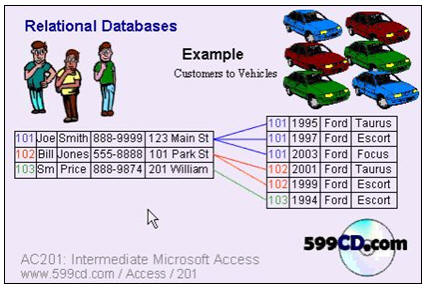
So far, the only types of relationships we've learned about have been either one-to-one or one-to-many. One-to-one relationships are used where you have one record related to exactly one other record, like the extended customer information form we made. It shows one additional screen of information for one customer.

A one-to-many relationship is the "traditional" relationship you find in most databases. One customer to many orders. One customer to many contacts. One manufacturer to many products. Etc.

In this class, I'm going to teach you about many-to-many relationships. This is what you'd use if you want to be able to put a many different customers in MULTIPLE groups... or put a different members in MULTIPLE classifications... or assign a several drivers to MULTIPLE vehicles... or assign a MULTIPLE supervisors to MULTIPLE employees. This type of relationship is extremely powerful.
Then, after we study relationships, we're going to work with dates. Dates are often misunderstood in Access. I'm going to teach you about the CDate() conversion function. I'm also going to teach you tricks for dealing with dates that you might import from someone else's database. Perhaps you got a date like "20070910" and you have to convert that to a regular Access date.


ACCESS 309 - Course Outline

0. Introduction

1. Relationships Review
One to Many
Many to Many
Cross Reference Tables
DriverXVehicleT

2. Cross Reference Table
Creating the Many-To-Many Relationship
Making a Cross Reference Table
Creating a Group Table for our Customers
CustomerXGroupT
CustomerXGroupQ

3. Group Form
Creating the Group Subform
Many To Many Form

4. Converting Numbers into Dates
Got a field with dates like 990105
Convert with an Update Query to 1/5/99
LEFT, RIGHT, MID functions
Update Query
String Concatenation
Calculated Fields

5. Addendum on Numbers to Dates
What if you have dates with 5 digits?
Using LEFT and LEN functions
CDate() to convert text to dates


Huge Discounts Available
When you purchase multiple classes together
Huge savings up to 50% off! Order Now.
 

Student Interaction: Microsoft Access 309

Richard on 10/9/2007:  Access 309 covers two main topics: creating MANY-TO-MANY relationships, and converting numbers and text fields to proper Access dates. You can find out more about this class on the Access 309 page. This is going to be the first class that I'm promoting student interaction with. The Amicron Video Player and the 599CD Theater will both have links to this blog post so that students who are taking the course can discuss it. They can post any questions they might have here (as comments) and we can work together interactively as students & teacher. I'm excited! Now, please, post your questions here!
Terry on 10/9/2007: Are many to many relationships the kind that you would use to track members and groups? I have a membership database i'm building with your lessons. I need to be able to put members in multiple groups.
Richard on 10/9/2007: Yes, that is exactly what you would use this for. Many people in multiple groups. Many drivers with multiple cars. Etc.
Twila Mitchell on 11/8/2007: As the database grows, I find myself coming back into old forms (or using them to copy). When in design view, I find it helpful to readily see text boxes that are not visible in form view. I immediately know what's invisible because I made their background color Hot Pink.
Richard Rost on 11/8/2007: Yes, this is an excellent idea. I do this myself from time to time - althought I have to say I don't use hot pink. :)
Margaret Cattarin on 3/14/2009: Access 309 at 05:03 I am following the video step by step to build a survey response form. Everything is great until I change the form properties to the CustomerXGroup Query. Then I lose the star and can't add new records. I change the properties back to the CustomerxGroup table, and the star is back. How to I fix this? Thanks, Maggie
Richard Rost on 3/15/2009: Margaret, it sounds like your query has properties that make it non-updateable. Can you open the query directly and add records to it? Make sure your query is exactly the same as mine (download the sample database file from the web site if you need to).


You may want to read these articles from the 599CD Blog:


Need Help
 
Do you have questions about Word, Excel, Access, Web Design, or computers in general? Just ask us anything you'd like. Click here for assistance.
 

Get Free Tips & Tricks
 

Join our mailing list today and get information on our Free Tips & Tricks Newsletter including free video tutorials, eBooks, live seminars, and more.

Email:
Name:
Type in the word to the left:
 
Your email will be kept 100% safe and will never be given to 3rd parties.


CLICK HERE for a FREE lesson


Order your first 599CD course now.
Your Satisfaction is Guaranteed!


Subscribe to our RSS FeedWhat's This?

599CD on Facebook  599CD on Twitter  Subscribe to RSS Feed  Add to Live Bookmarks  Add to My AOL  Add to MyYahoo  Add to Google Reader or Homepage    hide help

599CD Home   |   Learn More   |   What's New?   |   Contact Us   |   Free Demo   |   FAQs   |   Order Now   |   Affiliate Program   |   TechHelp   |   MYOLP   |   Jobs   |   Downloads   |   Handbooks  (Text)   |    Mailing List   |   Lost Passwords   |   Referral Program   |   Online Poll   |   Corporate, Educational, Government, Non-Profit Sales   |   Message Forums   |   Testimonials   |   Privacy Policy   |   Free Gift CDs   |   Tips & Tricks


What's New  |  Home  |  Courses  |  Demo  |  Learn More  |  Contact  |  Order