Access 2010
Access 2003
Seminars
Tips & Tricks
Access Forum
Course Index Insider Circle
 
Tutorials   News   Tips   Forums   Help   Logon   Order  


Tips & Tricks

New Tips Added Weekly!
Click here to get on our Mailing List


  Access   Excel   Word   Windows   FrontPage   Hardware   Misc


Find Last Day of Month

How to calculate the last day of any given month with VBA

Q: How do I calculate the LAST day of the current month?

A: Figuring out the first and last day of the month isn't that hard, but it's hard enough to where you'd want to make a custom function for it, instead of just trying to slip it into a query.

The first step is to create a PUBLIC FUNCTION for it in a module. So create a new Module:
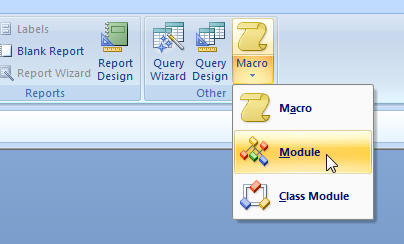
Last Day of Month VB

Here's the code I wrote. Take a look at it, and I'll explain it in detail momentarily:

Public Function LastDayOfMonth(D As Date) As Date

    Dim LDOM As Date
    Dim NM As Date

    NM = DateAdd("m", 1, D)
    LDOM = DateSerial(Year(NM), Month(NM), "1")
    LDOM = DateAdd("d", -1, LDOM)

    LastDayOfMonth = LDOM

End Function


First, I created two date variables - one a temporary holder for the Last Day of the Month (LDOM) and another to figure out what NEXT month's date is. Because the number of the last day of the month can change (28, 29, 30, 31), I decided it would be easier to find the FIRST day of NEXT month and then subtract one day.

So, I said Next Month (NM) is equal to the date in question PLUS one month. For more help on DateAdd see this tutorial.

Next, the LDOM is equal to the first day of NM's year and month. The DateSerial function just assembles a date from it's parts: Year, Month, Day. In this case, send a "1" to get the first day of the month.

Finally, I used DateAdd to subtract one day from LDOM which gives me the LAST day of the current month (or whatever month you send to the function.)

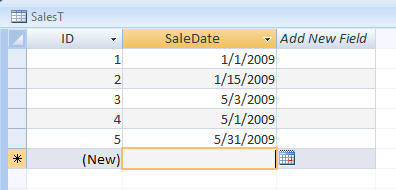
Now, where do you USE this? Well, you can use it in a query as a calculated field. Just set up a table with a bunch of dates:


Put some dates in...
 

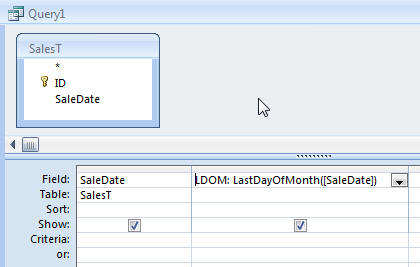
Create a query with that date field, and then insert your function as a calculated query field.
 

Now run the query to check your results:
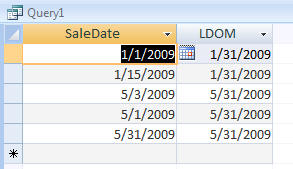
 

You can also use this function in your reports, forms, or even an AfterUpdate event to set a value in a field.


You may want to read these articles from the 599CD News:


Learn
 
Microsoft Access
Microsoft Excel
Microsoft Word
Microsoft Windows
Microsoft PowerPoint
Adobe Photoshop
Visual Basic
Active Server Pages
Online Seminars
More...
Customers
 
Account Login
Online Theater
Downloads
Lost Password
WalkThru Tutorials
Free Upgrades
Insider Circle
Info
 
Latest News
New Releases
User Forums
Tips & Tricks
Search Our Site
Waiting List
Production Schedule
Help
 
Live Chat
Customer Support
Troubleshooting
FAQs
TechHelp
Consulting Services
About Us
 
Background
Testimonials
Jobs
Affiliate Program
Richard Rost
Order
 
Video Tutorials
Handbooks
MYOLP Memberships
Idiot's Guide to Excel
Volume Discounts
Payment Info
Shipping
Terms of Sale
Contact
 
Live Chat
General Contact Info
Support Policy
Contact Form
Email Us
Mailing Address
Phone Number
Fax Number
Course Survey
Try Us
 
Free Lessons
Online Theater
Mailing List
Course Indexes:   Microsoft Access   Microsoft Excel   Microsoft Word   Microsoft PowerPoint   Visual Basic (VB)   Photoshop   Active Server Pages (ASP)  
Keyword Search Cloud:   What's This?   courses   microsoft access tutorials   vlookup   access   cartesian   excel   dlookup   vba   attendance   access 2007   sql   windows 7   combo box   pivot table   visual basic   test   iif   word   calendar   query   conditional formatting   pivot tables   photoshop   hlookup   access 101   excel 202   excel 2007   student attendance   update query   my account   word 2007   append query   quickbooks   queries   dsum   reports   powerpoint   if   microsoft access   dmax   mail merge   relationships   ms access   access 2010   vb   dcount   subforms   excel 2003   handbooks   html   599cd   combobox   if function   security   microsoft word   after update  
Copyright 2012 by 599CD.com, All Rights Reserved