|
This
course is for the expert user who
has good experience with Microsoft Excel or has completed the five
courses in our
Beginner Series plus
Expert Level 1. This course will teach you how to work with dates
and times in Excel.
We will
begin by learning the different valid date/time formats. You will learn
how Excel stores and handles dates internally (behind the scenes), and
you will learn how to perform date/time arithmetic: adding two
dates, calculating the difference in days between two dates, and so on.

Next, you will learn about all of the
different custom date/time codes. You will be able to construct
your own personalized date/time formats so that you can display values
exactly as you want. For example, you could create a custom date/time
that reads "Jan 01, 2011 at 6 PM."

Next we'll begin looking at the wide
array of date/time functions, including Now, Today, Year, Month,
Day, Hour, Minute, Second, Weekday, Date, and Time. You will learn how
to determine the current system date/time. You will learn how to
deconstruct a date/time value (what is the month component in
3/1/2011). You will learn how to build a date/time value from it's
various parts. You will learn more about adding dates and times
together (add 3 months to 4/5/2011).

You will learn how to calculate the
difference between two dates (in years, months, days, etc.). We will
cover the YearFrac and DateDif functions. You will see how
to calculate someone's current age given their date of birth. You will
learn how to calculate an anniversary date.


Often times you're given spreadsheets or
date from someone else who doesn't necessary know how to properly input
data. Next we'll learn how to fix bad date values given to you by
someone else. For example, perhaps they typed all their dates in as
"19990301". We'll see how to fix that.
We will cover more popular date/time
functions including DateValue, TimeValue, EDate, EOMonth. You'll
learn how to figure out the last day of any given month, and by
extension, how many days a particular month has (handy for accounting).
You learn the NetWorkDays,
NetWorkDays.INTL, WorkDay, WorkDay.INTL, and WeekNum functions. You'll
see how to calculate the number of work days (Mon to Fri) between
two dates. Then you'll see how to add your own custom list of
excluded work days (such as holidays). You'll also see how to
specify your own work week (perhaps you work Mon to Sat).

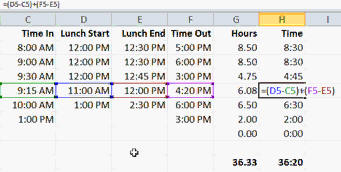
You will learn how to accurately
calculate the difference between two times. This is essential for
creating an employee time sheet, which we'll do in class. You'll
see how to calculate the total hours worked (including a lunch break).
You'll learn how to display the total time in either hours and
fractions of hours (such as 40.5) or hours and minutes (such
as 40:30).
Finally, we'll go over a ton of date
and time tricks. You'll learn more about AutoFill and how it handles
dates/times. You'll learn how to calculate specific date/time values,
such as the first and last days of a month, the total number of days in
any month, what quarter a month falls in, the first and last days
of a year, what day number (in the year) is it, how many days are
left in this year, and lots more. You'll also learn how to add up hours,
minutes, and seconds (and display them however you want) plus how to
work with fractions of a second.

Again, this is the perfect class
for anyone who wants to learn how to work effectively with dates and
times in Microsoft Excel. Of
course, if you have any questions about whether or not this class is
for you, please contact me.
Complete Outline - Excel
Expert Level 2
00. Intro (7:49)
01. Excel Dates & Times (9:12)
Valid Date Formats
Valid Time Formats
Valid Date/Time Formats
Understanding Internal Dates
Date Arithmetic
Adding Days
Adding Hours
02. Custom Date/Time Codes (6:33)
Customizing Date Formats
Custom Date & Time Codes
03. Date/Time Functions 1 (11:11)
Current System Date/Time
Current Time
NOW()
F9 to Recalculate
Current Date
TODAY()
Calculating the Time Only
Components of a Date
YEAR, MONTH, DAY
HOUR, MINUTE, SECOND
WEEKDAY
Changing WEEKDAY Start Day
Building a Date from Components
DATE
Buildnig a Time from Components
TIME
Adding Dates with DATE Function
Adding Times with TIME Function
04. Date/Time Functions 2 (14:13)
Calculate Difference in Dates
Calculate Age in Years Using Math
INT function
Difference in Whole Years
YEARFRAC
DATEDIF
Difference in Months Between Dates |
05. Date/Time Functions 3 (13:49)
Converting Bad Imported Dates
Convert 20110801 to 8/1/2011
Review of LEFT, RIGHT, MID
Convert Text Date to Actual Date
DATEVALUE, TIMEVALUE
EDATE
Determine Last Day of the Month
EOMONTH
Work Days Between Two Dates
NETWORKDAYS
Custom List of Excluded Holidays
Count Number of Workdays Forward
WORKDAY
NETWORKDAYS.INTL
WORKDAY.INTL
Custom Work Days String "0000011"
Week Number of the Year
WEEKNUM
06. Date/Time Functions 4 (12:04)
AutoFill with Days of the Week
AutoFill Date Options
Fill Days, Months, Years, Weekdays
Subtract Two Times
Format as a Number
Convert Days to Hours
Display Hours and Fractions
Display Hours and Minutes
Adding up hours with [h]:mm
07. Date/Time Tips & Tricks (13:57)
Creating a series of dates with AutoFill
Calculating specific dates
First day of a month
Last day of a month
Number of days in a month
What quarter is a date in
First day of the year
Last day of the year
Day number (of the year)
Days remaining in the year
Inserting the current date and time
Adding up hours, minutes, seconds
[h]:mm
[mm]:ss
Displaying fractions of a second
h:mm:ss.00
08. Review (4:28) |
|
| Keywords:
microsoft excel tutorial, microsoft excel tutorial, microsoft office excel tutorial, microsoft excel training, dates, times, date formats, time formats, date codes, now, today, year, month, day, hour, minute, second, weekday, datevalue, timevalue, edate, eomonth, networkdays, workday, networkdays.intl, workday.intl, weeknum, subtract times, first day of month, last day of month, days in a month, quarter, first day of year, last day of year, days remaining in year, custom date formats, yearfrac, datedif |