| |
| |
|
|
|
Excel Expert Level
3
Microsoft
Excel Expert Tutorial - 1 Hour, 11 Minutes |
| |
|
|
| |
This is the
third
class in our Excel Expert Series. It picks up where
Expert Level 2
left off. The focus of this course is working with logic
functions in Excel. Topics covered include:
 |
-
Understanding logic (boolean) values
- True, False, And, Or, Not
- Using the IF function to make decisions
- Nested IF functions for multiple options
- Calculating sales tax IF customer is in-state
- Assigning a pass/fail grade to a student
- Giving a student a letter grade (A-F)
- Time sheet calculations that cross midnight
- Is a given cell blank, text, number, etc. |

Order Now |
If you would like a preview of what's covered in this class,
click here to watch the first lesson of
this course (free of charge), or scroll down for more information.


|
|
Excel Expert Level 3 |
| Description: |
Excel
Expert Level 3 |
| Versions: |
Recorded with Microsoft
Excel 2010. Valid for 2007 to 2021. |
| Pre-Requisites: |
Excel
Expert Level 2 |
| Running Time: |
1
Hour, 33
Minutes |
|
Cost: |
$9.99 |
|
|
|
This
course is for the expert user who
has good experience with Microsoft Excel or has completed the five
courses in our
Beginner Series plus Expert Level 1
and 2 classes. This course will teach you how to work with
logic functions in Excel.
We will
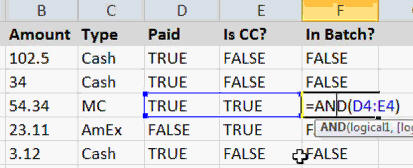
begin by learning about logical (boolean) values in Excel. You
will learn about TRUE and FALSE and the various core logic
functions, such as And, Or, and Not. You'll see how to determine whether
or not an invoice is paid, whether a customer should get a collection
letter, whether an order should be shipped, and whether a charge should
be added to a credit card batch. There will be a lot of examples in this
class, since understanding these functions is critical for making your
Excel spreadsheets smart.
Next, you will learn about one of the
most powerful functions in Excel: the IF function. Knowing how to
use IF properly will open up a whole new world for your spreadsheets.
You'll be able to make decisions with your data and provide different
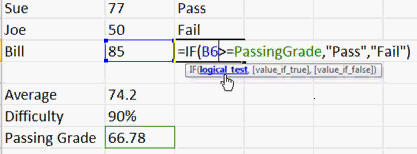
results based on conditions. We'll learn how basic "If/Then"
reasoning works in Excel. You'll see, for example, how to charge
sales tax for a customer IF they reside in your state. You'll
see how you can take a student's average and give them a Pass or Fail
grade.
Next you'll learn how to nest multiple
IF functions together to select from multiple options. We will
assign a letter grade to each of our students (A-F). You'll learn
how to create time sheet calculations that cross over midnight
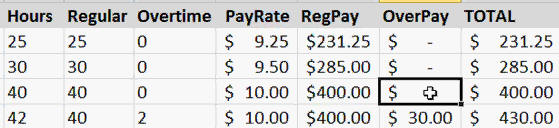
(difficult to do without IF). You will also learn how to calculate
regular and overtime pay for employees.
You will learn a bunch of different
functions to determine the contents of a cell. Is the cell blank?
Does it contain a number or text? Is there an error there? These
functions include IsBlank, IsError, IsText, IsEven, IsOdd, IsLogical,
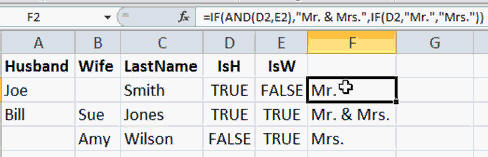
IsNumber, IsText, IsNonText, IfError, and more. You can use the
IsBlank function, for example, to determine whether or not to use
"Mr.", "Mrs.", or "Mr. & Mrs." for a mailing list, depending on which
names you have (husband, wife, or both).
Again, this is the perfect class
for anyone who wants to learn how to work effectively with logic
functions including the IF function in Microsoft Excel.
Mastering the IF function is one of the most important things you
can do while learning Excel. Of
course, if you have any questions about whether or not this class is
for you, please contact me.
Complete Outline - Excel
Expert Level 3
00. Intro (6:29)
01. Logic Functions (19:05)
TRUE, FALSE Values
0 = FALSE
AND, OR, NOT
Is an invoice late?
Is an invoice paid?
Collection Letter Example
Shipping an Order Example
Credit Card Batching Example
TRUE, FALSE Functions
02. IF Function 1 (14:18)
IF THEN Statement
IF THEN ELSE Statement
Charge Sales Tax Example
Set Tax Rate if in NY
Calculate Sales Tax
Calculate Credit Card Batch Total
Give Students PASS or FAIL Grade |
03. IF Function 2 (14:05)
Nested IF Functions
Assign a Letter Grade with IF
Fixing Our Time Sheet Example
Shifts That Cross Over Midnight
Calculating Overtime Pay
04. IS Functions (14:05)
ISBLANK, ISERROR
ISEVEN, ISODD
ISLOGICAL, ISNUMBER
ISTEXT, ISNONTEXT
Extra Space Between Names
FN, MI, LN
"Mr.", "Mrs.", or "Mr. & Mrs."
Divide by Zero errors
ISERROR to fix #DIV/0!
IFERROR to fix #DIV/0!
05. Review (3:20) |
|
| |
| Keywords:
microsoft excel tutorial, microsoft excel tutorial, microsoft office excel tutorial, microsoft excel training, true, false, logic, and, or, not, if, if then, if then else, collection letter, sales tax, credit card, pass, fail, nested if, letter grade, time sheet, overtime, isblank, iserror, iseven, isodd, islogical, isnumber, istext, isnontext, divide by zero, #DIV/o! |
| |
|
|


