Excel 2010
Excel 2007
Excel 2003
Tips & Tricks
Excel Forum
Course Index CIG Excel Book
 
Tutorials   News   Tips   Forums   Help   Logon   Order  


Tips & Tricks

New Tips Added Weekly!
Click here to get on our Mailing List


  Access   Excel   Word   Windows   FrontPage   Hardware   Misc


Using VLOOKUP or HLOOKUP
 
Q: How can I look up a value from a list of options in Excel?
A: You can use the VLOOKUP or HLOOKUP function
  VLOOKUP is a powerful function in Microsoft Excel that allows you to look up a value from another spreadsheet - or a smaller subtable (lookup table). We cover the VLOOKUP function in depth in our Microsoft Excel 202 class.

In our class, we begin by creating a simple gradebook for students. This gradebook has students' names and test grades. Our goal with VLOOKUP is to give them a letter grade by looking it up in the subtable.

We'll create a subtable (A8:B13) which will have our grades in it. We'll turn this table into a Named Range (a concept we also cover in this class) called LookupGrades.
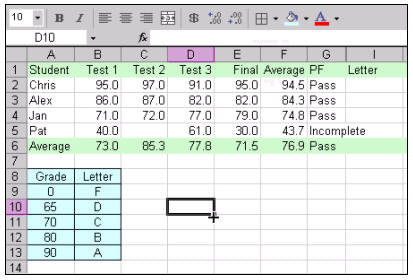
Next, we'll use the VLOOKUP function to look up their letter grade from the small subtable. In this particular case, the function would look like this:

=VLOOKUP(F2,LookupGrades,2)

F2 is the value that we want to look up (the student's average). The LookupGrades range is defined as a named range - the address of the little table shown. Finally the "2" indicates that we want to return column "2" - or the second column of our little subtable. You can then see all of the student's grades once you AutoFill the formula down the column.

That's it. VLOOKUP is really a pretty easy function to use, once you know how. In class, we'll also cover some more examples of using VLOOKUP - like how to look up a commission rate and bonus payments for sales reps.
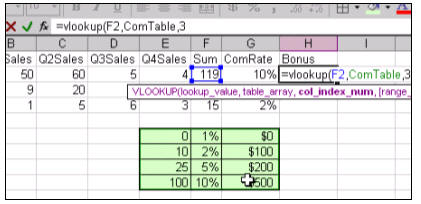
We'll also learn about HLOOKUP, which is the horizontal cousin of the VLOOKUP function. We'll use it to calculate a discount on a customer's invoice.

We have a FREE sample lesson available to show you more about VLOOKUP:
 Click here to view the FREE video
 

And, again, we cover this function completely in our Microsoft Excel 202 class. You will learn through step-by-step video tutorials how to use the VLOOKUP function in detail.

The full cost of this course is only $13.99 for a full one-hour video tutorial covering VLOOKUP plus lots more: Named Ranges, Nested IF Functions, and so much more.

Or, if you need more basic Excel training, we have beginner lessons starting as low as $5.99 for one-hour video tutorials.


You may want to read these articles from the 599CD News:


Learn
 
Microsoft Access
Microsoft Excel
Microsoft Word
Microsoft Windows
Microsoft PowerPoint
Adobe Photoshop
Visual Basic
Active Server Pages
Online Seminars
More...
Customers
 
Account Login
Online Theater
Downloads
Lost Password
WalkThru Tutorials
Free Upgrades
Insider Circle
Info
 
Latest News
New Releases
User Forums
Tips & Tricks
Search Our Site
Waiting List
Production Schedule
Help
 
Live Chat
Customer Support
Troubleshooting
FAQs
TechHelp
Consulting Services
About Us
 
Background
Testimonials
Jobs
Affiliate Program
Richard Rost
Order
 
Video Tutorials
Handbooks
MYOLP Memberships
Idiot's Guide to Excel
Volume Discounts
Payment Info
Shipping
Terms of Sale
Contact
 
Live Chat
General Contact Info
Support Policy
Contact Form
Email Us
Mailing Address
Phone Number
Fax Number
Course Survey
Try Us
 
Free Lessons
Online Theater
Mailing List
Course Indexes:   Microsoft Access   Microsoft Excel   Microsoft Word   Microsoft PowerPoint   Visual Basic (VB)   Photoshop   Active Server Pages (ASP)  
Keyword Search Cloud:   What's This?   courses   microsoft access tutorials   vlookup   access   cartesian   excel   dlookup   vba   attendance   access 2007   sql   windows 7   combo box   pivot table   visual basic   test   iif   word   calendar   query   conditional formatting   pivot tables   photoshop   hlookup   access 101   excel 202   excel 2007   student attendance   update query   my account   word 2007   append query   quickbooks   queries   dsum   reports   powerpoint   if   microsoft access   dmax   mail merge   relationships   ms access   access 2010   vb   dcount   subforms   excel 2003   handbooks   html   599cd   combobox   if function   security   microsoft word   after update  
Copyright 2012 by 599CD.com, All Rights Reserved