|
VLOOKUP is a powerful function in Microsoft Excel that allows you to look
up a value from another spreadsheet - or a smaller subtable (lookup table). We
cover the VLOOKUP function in depth in our
Microsoft Excel 202 class.
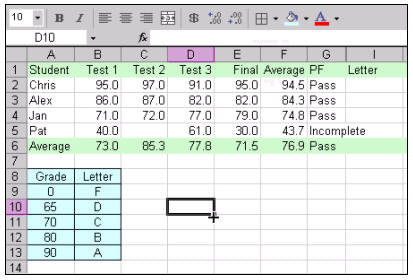
In our class, we begin by creating a simple gradebook for students. This
gradebook has students' names and test grades. Our goal with VLOOKUP is
to give them a letter grade by looking it up in the subtable.
We'll create a subtable (A8:B13) which will have our grades in it.
We'll turn this table into a Named Range (a concept we also cover in this
class) called LookupGrades.
Next, we'll use the VLOOKUP function to look up their
letter grade from the small subtable. In this particular case, the function
would look like this:
=VLOOKUP(F2,LookupGrades,2)

F2 is the value that we want to look up (the student's average).
The LookupGrades range is defined as a named range - the address of the
little table shown. Finally the "2" indicates that we want to return column "2"
- or the second column of our little subtable. You can then see all of the
student's grades once you AutoFill the formula down the column.

That's it. VLOOKUP is really a pretty easy function to
use, once you know how. In class, we'll also cover some more examples of using
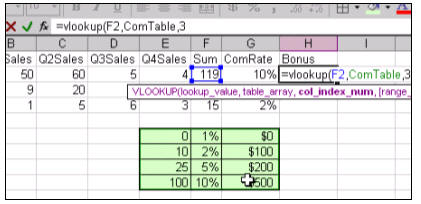
VLOOKUP - like how to look up a commission rate and bonus payments for sales
reps.
We'll also learn about HLOOKUP, which is the horizontal
cousin of the VLOOKUP function. We'll use it to calculate a discount on a
customer's invoice.

We have a FREE sample lesson
available to show you more about VLOOKUP:
And, again, we cover this function completely in our
Microsoft Excel 202
class. You will learn through step-by-step video tutorials how to use the
VLOOKUP function in detail.
The full cost of this course is only $13.99 for a full
one-hour video tutorial covering VLOOKUP plus
lots more: Named Ranges, Nested IF
Functions, and so much more. Or, if you need more basic
Excel training, we have beginner lessons starting as low as
$5.99 for
one-hour video tutorials. |


