Access SQL Seminar Part 3
Modify Database & Table Structure with SQL
Welcome
This seminar will pick up where Part 2 left off. You will learn more about the SQL programming language. We will focus on manipulating the structure of your Access database - building and modifying tables and queries with SQL commands. The techniques in this seminar are especially useful for the administrator or developer who has to support remote database files. You can now update them (add a table, change a field, etc.) with simple SQL commands.
 Resources Resources
Main Seminar Goals
- Learn how to create a modify a Table
- Discover the different Access SQL Data Types
- Create Indexes for your tables
- Connect to external databases using SQL
- Construct a CONSTRAINT clause
- Work with table relationships
- Differences between ANSI-89 and ANSI-92 SQL
- Set up Referential Integrity between your tables
- Create stored views and procedures
- Learn about Access database security via SQL
Topics Covered
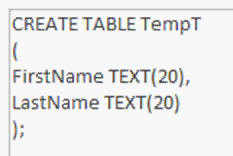
We will begin by learning how to create a TABLE in SQL. We'll talk about why it's important (and powerful) to be able to do this. We'll create a form to launch our SQL commands via VBA. We'll also see how to delete (drop) a table.
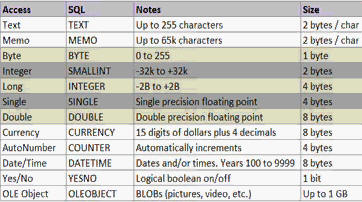
Next we will learn about all of the different Access SQL data types such as Text, Memo, Byte, Integer, and so on. You'll see how most of them are the same as regular Access, but a few things have changed.
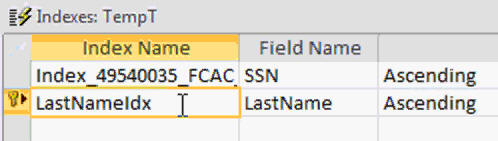
Next we'll learn how to set up Indexes with SQL. You'll create a PRIMARY KEY field, learn how to force unique values (indexed, no duplicates), and how to ignore or disallow NULL values.
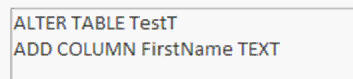
You will learn how to ALTER the structure of your tables once they're built. This is great for modifying existing databases. You can add or delete columns (fields), change some of their properties, and I'll even show you how to connect to external databases.
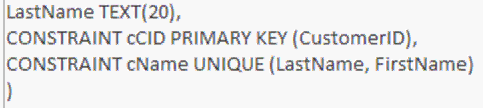
You will learn how to use a CONSTRAINT so that you can name a specific property of your table. This allows you to easily modify it later. You'll also learn how to create a multi-field index spanning two or more fields (and exactly what that is used for).
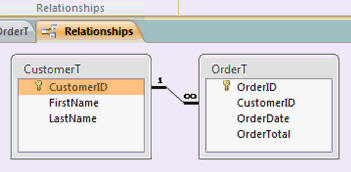
Next we'll learn how to set up relationships between two tables. You'll use a constraint to create a FOREIGN KEY field.
Next, we'll learn how to switch our Access databases over from ANSI-89 to ANSI-92 to unlock some additional new SQL features. We'll learn about the pros and cons of each version, and what some of the changes are. If you're using Access 2000 or earlier, a few of these lessons won't work for you because Access 2000 only supports ANSI-89. Sorry.
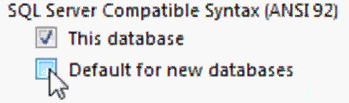
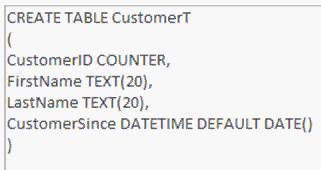
You will learn how to create a CHECK constraint (essentially a validation rule) and DEFAULT value for fields. You'll also learn about multi-field validation rules.
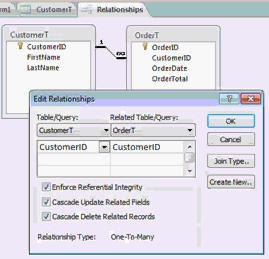
You will learn about Referential Integrity and how to set up the CASCADE UPDATE and CASCADE DELETE properties.
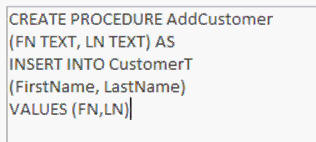
You'll learn how to create a VIEW and PROCEDURE, which are essentially queries in Access... but you'll learn about why they're important to know if you ever start working with and SQL server program.
Finally, we'll talk about Access security and SQL. You'll learn how to create users and groups, and how to assign various permissions to them for the objects in your database.

Again, this seminar is perfect for anyone who wants to learn how to supercharge their Microsoft Access databases with the added power of custom SQL. It is the third part of a three-part series. Of course, if you have any questions about whether or not this seminar is for you, please contact me.
Pre-Requisites
Access SQL Seminar Part 2 is strongly recommended, but not required.
Version
I am using Access 2010 in this seminar, however the lessons are perfectly valid for all versions of Access from 2003 and later. It's currently 2022 and I just recently verified that everything in this seminar still works with Access 2019 and Office 365. The SQL programming language as far as it pertains to Microsoft Access has not changed in a very long time.
Enroll Today
Enroll now so that you can watch these lessons, learn with us, post questions, and more.

Questions?
Please feel free to post your questions or comments below. If you are not sure as to whether or not this product will meet your needs, I'd rather help you before you buy it. Remember, all sales are final. Thank you.
Keywords
microsoft access sql, structured query language, create table, drop table, index, indexing, CREATE INDEX, CREATE UNIQUE INDEX, DROP INDEX, WITH DISALLOW NULL, WITH IGNORE NULL, WITH PRIMARY, ALTER TABLE, ADD COLUMN, ALTER COLUMN, DROP COLUMN, ALTER COLUMN NOT NULL, OpenDatabase, DB.Execute, CONSTRAINT, DROP CONSTRAINT, ADD CONSTRAINT, ANSI-92, ANSI-89, CONSTRAINT CHECK, ALTER SET DEFAULT, ALTER DROP DEFAULT, Referential Integrity, ON UPDATE CASCADE, ON DELETE CASCADE, CREATE VIEW, DROP VIEW, CREATE PROCEDURE, EXECUTE, ALTER DATABASE PASSWORD, GRANT, REVOKE, USER, GROUP, SCHEMA
More InformationTranscript Welcome to the Access SQL Seminar Part 3, brought to you by AccessLearningZone.com. I am your instructor, Richard Rost.
Part 1 in the series was to teach you basic SQL, such as Select Queries, to select and do data. Part 2 focused mostly on data manipulation: Update Queries, Append Queries, deleting records from tables, those kinds of things.
In Part 3, which is this class, we will focus mostly on database design, developing tables, views, procedures, and modifying the structure of the database from our SQL. We will learn how to create and modify tables using nothing more than SQL. We will learn about the different SQL data types and how they are similar to Access data types. We will learn how to index fields, such as setting up a primary and foreign key, and how to use certain constraints to control the data that is entered.
We will learn how to set up relationships between tables and enforce referential integrity. We will learn about ANC92 SQL, which is an upgraded version of SQL that Access supports but does not normally use. We will learn how to create stored views and procedures, which, while using Access for all intents and purposes, are pretty much the same as queries. We will also learn about database security.
Again, this is Part 3 of a 3-part series. If you have not watched Parts 1 and 2 of the SQL Seminar, I strongly recommend you watch those first before beginning this lesson.
I will be using Access 2010 for the videos in class today. I will be showing you some of the screens from Access 2003 because a few of the menus are different. Most of the material that I am going to show you today works for all versions of Access, with the exception that lessons 7 through 10 are not valid for Access 2000 and earlier. As long as you have Access 2002 XP, 2003, 2007, or 2010, everything is fine. If you are using Access 2000 or earlier, I am sorry, but the section on ANC92 SQL is not compatible with Access 2000 or earlier. If you do have that older version of Access, I strongly recommend you upgrade to at least Access 2003. However, you still will be able to enjoy most of the material in this class.
Now let's take a moment to go over exactly what is covered in each lesson of today's class.
In lesson 1, we are going to learn how to create a table using SQL. In lesson 2, we are going to learn about all the different Access SQL data types. In lesson 3, we are going to take a look at indexing our fields with SQL. In lesson 4, we are going to learn about altering table structure from SQL. In lesson 5, we are going to learn about constraints which give us more control over our tables. In lesson 6, we are going to learn about relationships and how to set up foreign keys in our SQL. In lesson 7, we are going to learn about ANC92 standard SQL and how it is different from Classic Access SQL. In lesson 8, we are going to learn how to use SQL to set a check constraint, which is basically a validation rule, and a default value. In lesson 9, we are going to talk about referential integrity with cascade updates and deletes. In lesson 10, we are going to talk about views and procedures, which are basically stored queries. In lesson 11, we are going to talk about user level security and how it works with SQL.
If you have any questions while you are taking this class, please feel free to post your questions in the Access Forum on the website. You will find we have a very active community of users, and either myself or one of them will be happy to answer your questions. If you would like to contact me directly and you do not want to post in the forum, feel free to use the contact page at accesslearningzone.com/contact.
Now sit back, relax, and get ready to enjoy the Access SQL Seminar Part 3. Intro In this lesson, you will learn advanced SQL techniques for database design in Microsoft Access, including how to create and modify tables using SQL, understand and apply SQL data types, set up indexing with primary and foreign keys, use constraints to control data entry, and enforce referential integrity through relationships. We will also cover the ANSI92 SQL standard, setting check constraints and default values, cascade updates and deletes, creating views and procedures, and explore user-level security. This is part 3. Quiz Q1. What is the primary focus of Access SQL Seminar Part 3?
A. Basic SQL select statements
B. Data manipulation queries
C. Database design and modifying structure using SQL
D. Importing and exporting data
Q2. Which of the following is NOT mentioned as a topic in Part 3 of the seminar?
A. Creating and modifying tables with SQL
B. Indexing fields
C. Generating complex reports
D. Setting up primary and foreign keys
Q3. What are constraints used for in SQL, according to the seminar?
A. To format query results
B. To control the data that is entered into tables
C. To sort records alphabetically
D. To export tables to Excel
Q4. Referencing the versions of Access, which version is NOT compatible with lessons 7 through 10?
A. Access 2010
B. Access 2007
C. Access 2003
D. Access 2000
Q5. What is ANC92 SQL as described in the video?
A. A type of report generation tool in Access
B. An upgraded version of SQL that Access supports but does not normally use
C. A programming language for Excel
D. A type of data import process
Q6. In lesson 9, what database feature is specifically covered?
A. Sorting tables by date
B. Referential integrity with cascade updates and deletes
C. Backing up databases
D. Printing labels
Q7. What is the purpose of setting up relationships and foreign keys in SQL, as mentioned in the seminar?
A. To enforce referential integrity between tables
B. To calculate sums and averages
C. To design user interfaces
D. To schedule database backups
Q8. Which of these is discussed as being similar to queries in Access?
A. Reports
B. Forms
C. Stored views and procedures
D. Macros
Q9. If a student has a question during the seminar, what is one way recommended to get it answered?
A. Call customer service
B. Visit the Access Forum on the website
C. Wait for the next seminar
D. Search for answers on social media
Q10. If using Access 2000 or earlier, which part of the seminar will NOT be fully compatible?
A. Creating tables with SQL
B. Indexing fields
C. ANC92 standard SQL lessons
D. Setting default values
Answers: 1-C; 2-C; 3-B; 4-D; 5-B; 6-B; 7-A; 8-C; 9-B; 10-C
DISCLAIMER: Quiz questions are AI generated. If you find any that are wrong, don't make sense, or aren't related to the video topic at hand, then please post a comment and let me know. Thanks. Summary Today's video from Access Learning Zone is Part 3 of the Access SQL Seminar series. My aim in this seminar is to help you take your understanding of SQL in Microsoft Access to a new level, by focusing on how SQL can be used to design and manipulate the structure of your database.
Let me start by reviewing how we got here. In Part 1, I introduced you to the basics of SQL, showing you how to use Select Queries to retrieve and work with data. In Part 2, our focus shifted to data manipulation. We explored how to update data, append new records, and remove data from tables using SQL.
In this third and final part of the series, our main focus will be on database design and management entirely through SQL. I will show you how to create and modify tables using SQL statements, so you will not need to rely on the Access table designer interface. You will learn about the various SQL data types and how they relate to Access data types, which is important for structuring your data effectively.
We will look at how to index your fields, including setting up primary and foreign keys to ensure data integrity. I will also explain how to use constraints, which allow you to control the type of data that gets entered into your tables.
A core element of this seminar is understanding relationships between tables. I will demonstrate how to set up relationships, use foreign keys, and enforce referential integrity—all from within SQL. We will also touch on ANC92 SQL, which is a more advanced and standardized form of SQL that Access supports, although it is not the default option in Access.
Additionally, you will learn how to create stored views and procedures. In the context of Access, these function similarly to regular queries, but knowing how to create them through SQL will give you an extra layer of flexibility. We will also cover some fundamental principles of database security.
Before you begin this class, I strongly recommend watching Parts 1 and 2 if you have not already done so. This seminar builds on the concepts covered there.
For your reference, I am using Access 2010 throughout the class. I will highlight a few differences found in Access 2003, mainly in menu placement. Most of what I discuss will apply to Access versions 2002 XP, 2003, 2007, and 2010. Be aware that lessons 7 through 10 use features—including ANC92 SQL—that are not compatible with Access 2000 or earlier. If you are using Access 2000 or an even older version, you will not be able to do everything covered in those lessons, so I recommend upgrading to at least Access 2003 to take full advantage of this seminar. However, you will still benefit from most of the content.
Now let me outline what you can expect in each lesson.
- Lesson 1 focuses on table creation using SQL.
- Lesson 2 examines the Access SQL data types.
- Lesson 3 deals with adding indexing to your fields through SQL.
- Lesson 4 is dedicated to altering table structures.
- Lesson 5 explains constraints for controlling data input.
- Lesson 6 centers on creating relationships and foreign keys.
- Lesson 7 introduces ANC92 standard SQL and how it differs from the classic Access SQL.
- Lesson 8 shows you how to apply check constraints (which act like validation rules) and set default values.
- Lesson 9 explores referential integrity along with cascade updates and deletes.
- Lesson 10 discusses how to work with views and procedures, which serve as stored queries.
- Lesson 11 covers user-level security and its relationship to SQL.
If you have any questions as you progress through this seminar, I encourage you to visit the Access Forum on my website where we have an active and supportive community. You are welcome to post your questions there or use the contact page if you prefer to reach me directly.
I hope you enjoy Access SQL Seminar Part 3. For the complete video tutorial and step-by-step instructions on everything discussed here, visit my website at the link below.
Live long and prosper, my friends. Topic List Creating tables with SQL in Access
Access SQL data types overview
Indexing fields with SQL
Altering table structure using SQL
Defining constraints in tables
Setting up relationships and foreign keys with SQL
Using ANC92 standard SQL in Access
Implementing check constraints and default values
Enforcing referential integrity with cascade options
Creating views and stored procedures using SQL
User level security in Access with SQL Primary Topics SQL table creation, Access SQL data types, table indexing, modifying table structure, constraints, relationships and foreign keys, ANC92 SQL, check constraints and default values, referential integrity, views and procedures, user level security
Secondary Topics Access version compatibility, differences in Access menu screens
|