| HELP |
If your lessons install properly, but the
Amicron Video Player locks up, the problem could be from any number of
issues. First, try all of the other steps listed on our
troubleshooting page (reboot, check your
minimum hardware requirements, check your version of Windows Media Player,
etc.)
After you've tried all of these things, try
manually playing the video files WITHOUT the Amicron Video Player.
Our 599CD course videos are recorded in a standard WMV (Windows
Media Video) file format that does not require any special player.
Any version of Windows Media Player from version 7.1 on should be
able to play our videos just fine.
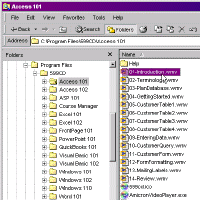
Open up My Computer or Windows Explorer
and navigate to your Program Files folder (this is usually
C:\Program Files for most people). In
the Program Files folder you should see a 599CD folder. Under the
599CD folder you should find a separate folder for each 599CD course you
purchased. Inside of each of these folders, you will find the individual
video files for your course.
click to enlarge
By double-clicking on these numbered files,
they should open up and play in whatever version of Windows Media Player
you have on your system. If they do not play, then the problem is
on your system, and not with our software. As a reminder, the
minimum system requirements for our software are listed
here. As long as you have at least Windows
98 with Windows Media Player 7.1 or higher, everything should play fine.
There is nothing special about the Amicron Video Player, and you do NOT
need it to watch the 599CD videos. It is simply a "pretty package" for our
course videos - nothing more. |