Get a Value from an Open Form Field
Using Forms!FormName!Field Notation To Read a Form Value
Q: How can I run a report showing just orders from a
specific customer - preferably from the customer record that's currently
open on my screen?
A: In order to do this, you
have to build a query limits its results based on the currently open
customer on the customer form. Assuming your customer form is called
CustomerF and the customer's ID is CustomerID then you would
set your query criteria to:
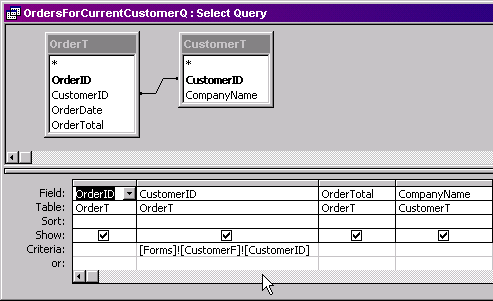
=Forms!CustomerF!CustomerID
Now any forms, queries, or reports that you build that use this query as
a recordsource will show only related records for the current customer.
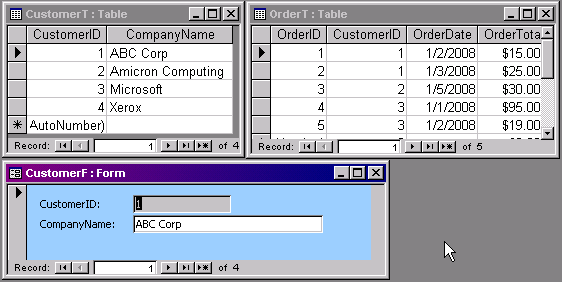
Here is a sample database that I built that illustrates. I have a simple
customer table, order table, and customer form.

click image to enlarge
You can build a query that says "only show me the order records for the
currently open customer" like this:

click image to enlarge
Now, as long as your customer form is open and you run this query - or
any other reports or forms that are based on it - you will see only the
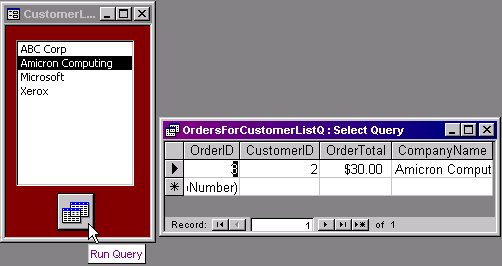
orders for the currently open customer. You can do the same thing with a
form, basic listbox, and a button to open another query:

click image to enlarge
This is slightly more complicated, but uses the exact same principle.
Here is a FREE VIDEO TUTORIAL
that will walk you through setting this up on your own, as well as a
FREE SAMPLE DATABASE file
that you can look at to get you started.
I teach the concepts in this free mini tutorial in my
Access 201 and
202 courses. These are full
courses - over 60 minutes in length each. I spend a lot more time going over how
to do this, in addition to lots more tips and tricks. For more information on
these courses, click on the links to each class.
Update: If you're referring to a
value on a subform inside another form, it gets even more complex. Let's
say you have an OrderSubform inside your CustomerF (to show his order history).
If you want a value off that subform, it becomes:
=Forms!CustomerF!OrderSubForm.Form!OrderTotal
So in a nutshell, you're either looking for:
=Forms!FormName!FieldName
Or...
=Forms!ParentForm!SubForm.Form!FieldName

By Richard Rost


Click here to sign up for more FREE tips
|