|
This
course is for the
novice
user who has little or no experience with
Microsoft Excel except for my
Basic Level 1,
2,
3, and
4 courses. Today's course covers a wide variety of topics
that didn't fit into any other lesson, but are important to learn.
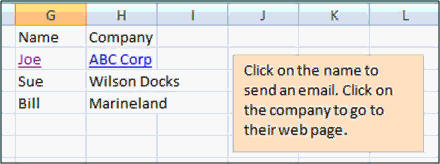
We'll start by learning how to insert
hyperlinks, text boxes, WordArt, signature lines, and
other objects into our sheets.
Next, we'll learn how to insert
symbols and other special characters into our sheets -
including foreign language letters.

You will learn how to work with
Headers & Footers. You'll see how to manually create a header,
enter in your own text, and use special codes to represent the page
number, total number of pages, date & time, and more. You'll also see
how to use the built-in Header & Footer templates.

Next we'll learn how to work with large
spreadsheets. You'll learn how to freeze panes (the top
row or the left column) so you can scroll around and still see the
headers in your sheet. You'll learn how to split your sheet
into two so you can work on two sections at once.

You'll learn how to work with
borders and gridlines. You'll learn how to change the visible
borders in your spreadsheets, and choose whether or not to print
gridlines.

You'll learn how to merge cells
(merge and center, merge across, unmerge), change cell orientation,
rotate text, and use the Format Painter to quickly copy
cell formats.

We'll learn how to put comments
in our cells so you can store additional information in your
spreadsheets. We'll see how to edit, delete, and permanently show or
hide the comments.

You'll learn how to use Excel's
research tools to spell check your sheet, use the thesaurus,
translate words, and even download real-time stock quotes
from the web and insert them into your sheets.

Finally, you'll learn how to download
spreadsheet template from Microsoft Office Online.
We'll download a calendar template, an invoice template, and a mortgage
calculator template. There are thousands of templates online that you
can choose from.

Again, this is the perfect class for
anyone who is new to Microsoft Excel 2007 and has finished
my
Basic Level 1,
2,
3, and
4 courses. If you have little or no experience
with spreadsheets, or you just want to get familiar with how Excel 2007
works, this class is for you.
Of
course, if you have any questions about whether or not this class is
for you, please contact me.

Complete Outline - Excel 2007
Basic 5
1. Insert Text 1 (7:47)
Insert > Text Group
Insert Hyperlink
Web Page Hyperlinks
Email Hyperlinks
Insert Text Box
Insert WordArt
Insert Signature Line
2. Insert Text 2 (3:54)
Insert Object
Insert Symbol
3. Header & Footer (7:59)
Insert Header & Footer
Three Sections
Header & Footer Elements
Entering Text in Header
&[Page] Code for Page Number
Page Footer
Date Code
Header & Footer Templates
Go To Footer, Header
4. View Window (6:43)
Working with Large Sheets
Create a Large Sheet of Data
Freeze Panes
Freeze Top Row
Freeze First column
Split the Window |
5. Borders (4:26)
Printing Gridlines
Changing Borders
Top, Left, Right,
Bottom
Inside, Outside Borders
Thick Borders
6. Misc Format Tricks (5:28)
Merge and Center
Merge Across
Merge Cells
Unmerge Cells
Cell Orientation
Format Painter
Double-Click Trick
7. Comments (3:42)
Insert Comment
Edit Comment
Delete Comment
Show, Hide
Comments
Previous, Next Comment
8. Research (5:20)
Spell Check
Thesaurus
Getting Stock Quotes
Translate
9. Online Templates (5:03)
How to Download Templates
Calendar Template
Invoice
Template
Home Mortgage Template |
|