599CD.com Access Imaging Seminar Done   Collapse Menus
 
 
NEW Courses - Access Imaging, Excel 2007 Level 5 dismiss


What's New?  |  Courses  |  Theater  |  Demo  |  Tips  |  Blog  |  Forums  |  Search  |  Help  |  Order

 
What do you want to learn today? 


Excel 2007 Basic Level 4
Beginner Microsoft Excel Tutorial - 64 Minutes

 
This tutorial picks up where our Excel 2007 Basic 3 class left off. In this tutorial, you will learn:
 
  - What are Charts & Graphs
  - Insert Column, Pie, Line Charts
  - Multiple Series in Charts
  - Formatting Chart Objects
  - Copy Charts to Microsoft Word
  - Creating a Summary Sheet / Dashboard
  - Working with Data Tables

Order Now

If you would like a preview of what's covered in this class,
click here to watch the first lesson of this course (free of charge), or scroll down for more information.


Excel 2007 Basic Level 4
Description: Excel 2007 Basic Level 4
Versions: Microsoft Office Excel 2007
Pre-Requisites: Excel 2007 Basic Level 3
Running Time: 64 Minutes
Cost: $9.99


This course is for the novice user who has little or no experience with Microsoft Excel except for my Basic Level 1, 2, and 3 courses. Today's course is mostly about Charts & Graphs.


We'll start by learning the basics of charting. What is a chart? What are the parts of a chart? We'll see how to create a simple column chart and insert it into our spreadsheet.
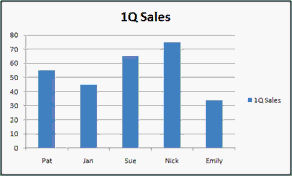


Next, we'll learn how to add data to an existing chart, create a line chart, make a chart with multiple series of data, and work with chart styles and themes.


You will learn how to select non-contiguous data (that's two ranges of data that aren't next to each other) so you can graph information that's in different areas of your sheet. You'll make a 3D pie chart and a 3D column chart. You'll see how to move the chart to a different sheet, change the chart layout, and the chart type.


Next we'll learn how to switch the row and column axes, format all of the different objects inside of our chart (titles, axes, walls, etc.), and insert comments, lines, shapes, and other objects inside the chart as well.


You'll learn how to copy your charts to Microsoft Word to embed them inside of reports or other documents. You'll see how to create a summary sheet (also known as a dashboard). You'll learn how to separate a piece of pie from a pie chart, and create leader lines.


Finally, we'll learn how to create Data Tables which are database-like lists of information in Excel. You'll see how to use table styles to format them, how formulas work in series, how to use AutoFilter, and create a total row.


Again, this is the perfect class for anyone who is new to Microsoft Excel 2007 and has finished my Basic Level 1, 2, and 3 courses. If you have little or no experience with spreadsheets, or you just want to get familiar with how Excel 2007 works, this class is for you.

Of course, if you have any questions about whether or not this class is for you, please contact me.



Complete Outline - Excel 2007 Basic 4

1. Charts 1 (7:53)
What is a Chart
Parts of a Chart
Insert a Column Chart

2. Charts 2 (8:08)
Add Data to an Existing Chart
Line Charts
Multiple Series in a Chart
Chart Styles & Themes

3. Charts 3 (11:00)
Selecting Non-Contiguous Data
3D Pie Charts
Move Chart to new Sheet
Format Objects Inside Charts
Chart Layouts
Change Chart Type
3D Column Charts
4. Charts 4 (7:03)
Switch Row/Column
Current Selection Box
Format Selection
Reset to Match Style
Insert Shapes
Insert Text Box
Labels
Chart Title
Axis Titles
Legend
Data Labels
Data Table

5. Charts 5 (8:05)
Copy Charts into Word
Creating a Summary Sheet
Dashboard

Separate a Slice of Pie
Create a Leader Line

6. Tables (9:45)
Creating a Table
Why Use a Table
Table Styles
Table Formulas are Uniform
New Rows Copy Formulas
AutoFilter in Tables
Total Row
Insert New Row


Huge Discounts Available
When you purchase multiple classes together
Huge savings up to 50% off! Order Now.
 

Student Interaction: Excel 2007 Basic 4

Richard on 1/1/2009:  This is the fourth beginner class for the Microsoft Excel novice. You will learn: What are Charts & Graphs, Insert Column, Pie, Line Charts, Multiple Series in Charts, Formatting Chart Objects, Copy Charts to Microsoft Word, Creating a Summary Sheet / Dashboard, Working with Data Tables


You may want to read these articles from the 599CD Blog:


Need Help
 
Do you have questions about Word, Excel, Access, Web Design, or computers in general? Just ask us anything you'd like. Click here for assistance.
 

Get Free Tips & Tricks
 

Join our mailing list today and get information on our Free Tips & Tricks Newsletter including free video tutorials, eBooks, live seminars, and more.

Email:
Name:
Type in the word to the left:
 
Your email will be kept 100% safe and will never be given to 3rd parties.


CLICK HERE for a FREE lesson


Order your first 599CD course now.
Your Satisfaction is Guaranteed!


Subscribe to our RSS FeedWhat's This?

599CD on Facebook  599CD on Twitter  Subscribe to RSS Feed  Add to Live Bookmarks  Add to My AOL  Add to MyYahoo  Add to Google Reader or Homepage    hide help

599CD Home   |   Learn More   |   What's New?   |   Contact Us   |   Free Demo   |   FAQs   |   Order Now   |   Affiliate Program   |   TechHelp   |   MYOLP   |   Jobs   |   Downloads   |   Handbooks  (Text)   |    Mailing List   |   Lost Passwords   |   Referral Program   |   Online Poll   |   Corporate, Educational, Government, Non-Profit Sales   |   Message Forums   |   Testimonials   |   Privacy Policy   |   Free Gift CDs   |   Tips & Tricks