| |
| |
|
Courses - Microsoft
Access 321 |
| Description: |
Advanced Access
Recordsets |
| Running Time: |
79 minutes |
| Pre-Requisites: |
Access 320 very strongly recommended |
| Previous Lesson: |
Access 320
|
| Next Lesson: |
Access 322
|
| Main Topics: |
SQL WHERE, Multi-Select Listbox, AddItem to Listbox, Add Edit Delete Records
|
| Versions: |
This course is valid for Access 2000 through 2003.
If you are using Access 2007 or 2010, you will still benefit from this course.
You will find that the concepts are the same, but there are cosmetic differences between the versions.
|
|
Order before 5/21/2013 to
get a FREE upgrade to our
Access 2010 version!
Click here for details
|
|
|
|
|
| |
|
We will begin by learning how to open a Recordset
with an SQL statement.

You will learn how to load a list of customers
into a Listbox using your Recordset.

You'll learn how to generate a list of active
states based on which states appear in your customer table. This way
you don't have to see a list of all 50 states if you have no customers
from most of them.

You'll learn how to modify the records in your
Recordset. In this case, we'll make a button that you can click once and
it will increment the number of seminars that each customer has
attended.

You will learn how to work with Multi-Select
List Boxes so you can pick one or more specific records in a listbox
to work with.

You'll learn how to add new records to
your table and listbox using the recordset.
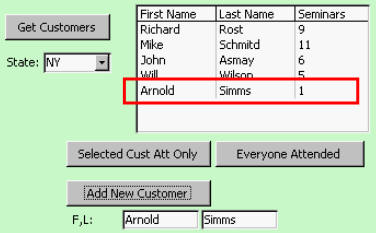
You'll learn how to delete the selected
records.

Finally, you'll learn how to use db.Execute
to run an SQL statement.

Access 321 - Course Outline
1. Customer ListBox, Part 1
Open Recordset with SQL
SQL WHERE Statement
Adding Items to a ListBox
AddItem
Row Source Type: Value List
Access 2000 Users: No AddItem
2. Customer ListBox, Part 2
Add the ID
Column Widths
Clearing Your List Box
ListCount
RemoveItem
Combo of Unique States
3. Edit Records
Editing One Record
rs.Edit
rs.Update
Editing Multiple Records
Loop Through And Edit
4. Multi-Select List Boxes
Simple v. Extended
Loop Through Items With ListCount
.ItemData(x)
.Column(1,Row)
.Selected Property
For Each
Object Collections
5. Adding & Deleting Records
Adding a Record
AddNew
Sorting Our Customer List
Deleting Records
rs.Delete
Always Have an Are You Sure? Prompt
6. Execute
db.Execute
INSERT INTO SQL Command
|
| |
Student Interaction:
Microsoft Access 321
|
Richard on 1/1/2008:
Working with unbound ListBox controls, editing recordset data, multi-select listbox, adding & deleting recordset data. |
Richard on 2/26/2009: ATTENTION STUDENTS: if you are using Access 2000 or earlier, you will NOT have a Listbox AddItem or RemoveItem command available. See this page for details.
|
Harry on 3/5/2009: What is your view on using the prefix (if that is the right word) me. in front of field names?
I like to do it because it triggers intellisense (sp?)
Also, I try to run the Debug/compile routine after writing code but before trying it out. Do you think that is a good practice/
|
Harry on 3/5/2009: is there any difference in using:
me.firstname.setfocus
vs
DoCmd.GoToControl "FirstName"?
|
Harry Mullin on 3/5/2009: You specify ID's as Integers. Shouldn't they be Long to avoid breaking at 32k names?
|
Richard Rost on 3/6/2009: Harry, both are fine. If you like using Me! you can. Personally, I don't use it because I started writing code way back in Access 2.0 which didn't support all this newfangled stuff. It's certainly an acceptable practice though. As far as debugging your code before running it, again, there's nothing wrong with it. I usually don't bother debugging until I have a problem.
|
Richard Rost on 3/6/2009: Harry, functionally both SetFocus and GoToControl work about the same. 99% of the time there is no difference. However, I have run into situations where ONE of the two works and the other doesn't. I don't really know why. I've had problems, especially, when trying to go to controls on a SUBFORM or tab control. Sometimes GoToControl works and SetFocus doesn't... so keep both in your toolbox. One (SetFocus) is a method of a control, the other is a command.
|
Richard Rost on 3/6/2009: Harry, yes, IDs should always be LONG INTEGERS. I specify this all the way back in Access 101. Where did I make one an Integer?
|
Ray McCain on 8/13/2009: My limited use of delimeters causes the visability of long code statements to be a problem when the end of the statement does not stay on the screen long enough to hit the pause button. In this instance it seems that you are going to fast.
|
BRYAN binkerd on 9/30/2009: customerlistbox 1 10:14 I've been writing vba on access 2003 and loading it on to computers running access 2000. Found out the hard way that the box.additem didn't work. Is there a majic Fix? I did reprogram it to 2000 but it might help for others. I got the rowsource to work with multiple columns by typing Box.RowSource = Box.RowSource & ";" & SomeValue & ";" & SomeValue & ";" By the Way do you have a list of objects that conflict with vba such as the listbox?
|
Richard Rost on 10/1/2009: Bryan, I addressed this problem in a TIP here: Listbox AddItem for Access 2000. I'm pretty sure I posted it in the Student Forum for that lesson. No?
What do you mean by a "list of objects that conflict with VBA?" This really isn't a conflict. It's a feature that simply didn't exist in 2000.
|
Bryan Binkerd on 10/1/2009: as always, you rock. To counter clarify, is there a list of features that are available in 2007 vs 2003 vs 2000. The reason I said conflict is because I checked the 2003 file format to 2000. I thought this was the "Majic Fix". As always thanks for your replies
|
Richard Rost on 10/2/2009: Bryan, I looked around a little while researching my upcoming Access 2007 class, and all I could find was a definitive "what's new" guide on Microsoft's web site that covered newly added features. It showed a list of new features in the "normal" user part of Access, but didn't really go into VBA much. If anyone else knows of such a guide, I would LOVE to get my hands on it too, because every time I record a lesson, I always have to manually test it in Access 2007 then 2003 then 2000 (sorry, don't have XP anymore) just to make sure it works for EVERYONE.
|
BRYAN binkerd on 10/7/2009: Rick, I have a company that does service work Whole Good Tractor Sales Parts Sales
I have 3 different forms my question is this I have a customer form The customer form has 3 subforms with source written in sql. Which is more efficient, 3 subforms on one form or 3 listboxes sourced by recordsets. Thanks, Bryan
|
Richard Rost on 10/7/2009: If the subforms are simple (no complex objects like combo boxes on them that require MORE querying) then I would say both are probably about equally efficient. That's just my instinct though - not scientific fact. :)
|
Twila on 1/13/2010: I do not recall you ever discussing this bit of code before: WHERE State= '" & State & "'"
Could you take a minute and explain what the extra "" and ' ' are for so that we can understand when and where to use them? Thanks!
|
Richard Rost on 1/15/2010: I know I talked about them in one of my classes (I think AC311). Basically you want your search string to say:
State="NY"
But you're sending the NY dynamically with a field, so you need to say:
State='" & StateField & "'"
You can either use single quotes inside of double quotes or two double quotes:
State=""" & StateField & """"
Make sense now?
|
Naomi Roll on 2/9/2010: Richard, how can I sort or order my listbox. Eg. Surname ascending, then Firstname ascending and not have the box sorted by ID? Your help is always appreciated. Thankyou
Reply from Richard Rost:
Naomi, the easiest way is to feed your listbox with data from a query that's sorted the way you want it. Create the sorted query FIRST, then use that to fill the listbox with data.
|
Chris on 3/28/2010: Richard, You may want to have a cavet on these course (Access 321-329) regarding the issue with ADO vs DAO libraries on Access 2000, I definitely had the problem that you referred to in Access 320. In fact, I had to also deactivate the ADO or the material would not work.
Reply from Richard Rost:
I think I did mention that in there somewhere. Some of the versions of Access (I can't recall exactly which ones) do require you to not only move DAO higher in the priority list, but also de-reference ADO. It's a mess. I'm glad they finally decided to standardize on DAO though. It's much more flexible.
|
Kenneth Lange on 11/26/2010: Being an Access 'Newbie', I Really Enjoy All the Additional Knowledge & Comments. I am Enjoying your Recordset Series!
|
Benjamin Chua on 11/16/2011: Access 321 How do I select to get between dates?
example: SELECT * FROM WorkLogT WHERE is between from a date and a date???
Reply from Richard Rost:
SELECT * FROM WorkLogT WHERE MyDateField > #1/1/2001# AND MyDateField < #2/1/2001#
If those values are fields, which one of my astute students can show Benjamin the correct way to display it as a STRING?
|
Ben Chua on 11/17/2011: Should I create a Dim MyDatefield as String?
then call it?
I only have i field for date in WorkLogT, which is Date.
Also I created a two text boxes DateFrom and DateTo
In my statement I say this... MySQL = "SELECT * FROM WorkLogT WHERE State='" & State & "' And MyDateField > DateFrom And MyDateField < DateTo
I also created a query to try it out MySQL = "SELECT * FROM CustomerListbyStateQ WHERE State='" & State & "' And MyDateField > DateFrom And MyDateField < DateTo
I make no sense do I? :o LOL!
man this is addicting.
Reply from Richard Rost:
Looking good so far, but a couple of notes...
First, never make a field called "Date". Like "Name", "Date" is a reserved keyword in Access. Best to avoid it. Call your field "WorkDate" or something. It will WORK, but then you have to remember to put [brackets] around it all the time or else Access might think you mean the Date() function.
Next, if your SQL works the way you have it written, that's fine - go with it. However, you might need to take your DateFrom and DateTo values OUTSIDE of the string (like you did with State). And remember, date values need to be enclosed in # signs. So your SQL would look like this:
MySQL = "SELECT * FROM CustomerListbyStateQ WHERE State='" & State & "'" And MyDateField > #" & DateFrom & "# And MyDateField < #" & DateTo & "#"
Which Access will translate into:
MySQL = "SELECT * FROM CustomerListbyStateQ WHERE State='NY'" And MyDateField > #1/1/1990# And MyDateField < #2/1/1990#"
And yes, this stuff is VERY addicting! :)
|
Ben Chua on 11/17/2011: I am getting error 13 Type Mismatch.
Here are my observations 1. the dim MyDateField does this have to set as a String or Date? 2. it is currently set as Dim MyDateField as Date 3. when i get the error and click debug, when i mouse over the yellow line where it says MyDatefield it is showing as MyDateField = 12:00AM 4. is this the reason why it is type mismatch because I am comparing time to a date? because the DateFrom and the DateTo is coming correctly, it shows DateFrom = 7/1/2011 and the DateTo = 7/15/2011 5. When you say "you might need to take your DateFrom and DateTo values OUTSIDE of the string" what exactly do you mean by this? put it outside the quote?
Reply from Richard Rost:
MyDateField is the name of the date field you're using in your table. Don't DIM it. Replace it with the name of your table's field.
|
Ben Chua on 11/17/2011: Compile Error
MySQL = "SELECT * FROM CustomerListbyStateQ WHERE State='" & State & "'" And WorkDate > #" & DateFrom & "# And WorkDate < #" & DateTo & "#"
Reply from Richard Rost:
That was my fault... one too many double-quotes in there. Try this:
MySQL = "SELECT * FROM CustomerListbyStateQ WHERE State='" & State & "' And WorkDate > #" & DateFrom & "# And WorkDate < #" & DateTo & "#"
|
Benjamin Chua on 11/18/2011: Access 321 Time 5:24
when you double click a list box, For example Mike Schmitd, it returns a value of 4.
In CustomerT this 4 is the CustomerID of Mike.
Question: How can you open a form for CustomerF where CustomerID =" & CustomerID?
Because if I do a msgbox customerID it returns a null.
Reply from Richard Rost:
The value is stored in the list box (CustomerList). So you could create a button that says:
Docmd.Openform "CustomerF",,,"CustomerID=" & CustomerList
This will get translated by Access to:
Docmd.Openform "CustomerF",,,"CustomerID=4"
Got it?
Remember "CustomerID" is the field on the FORM YOU'RE OPENING - in this case, CustomerF.
|
Ben Chua on 11/18/2011: Yup I did it at first but the " and ( sometimes mess mess me up.
|
Ben Chua on 11/20/2011: What did I do wrong? I noticed that when I docmd.open form, the form opens but it is giving me to add a record. I turned on record selectors and it shows me 1 of 1 the endrecord is Greyed out.
Example is from previous command Docmd.openform "CustomerF",,,"CustomerID=" & CustomerList
Even I change the customerlist to = 4
I did some test, maybe I am doing something wrong in the code.
I created a new button on a new blank form, I called it test. The event for the open click button is
Docmd.openform "CustomerF",,,"CustomerID=4"
This is just to satisfy me and you.
The result is the same, the form open but it give me a blank for as if I will enter a new record.
Waaaah!
Reply from Richard Rost:
Check the underlying table. Do you have a record with and ID of 4?
|
Aunali Bhalloo on 1/10/2013: Access 321 Video: 4
Hello Richard
Kindly let me know if there is a way to swap or select all the records in a list box with just one click to a button and also to clear or de-select all the records with a click of a button (time index 0.41)
Reply from Richard Rost:
Well, you can manipulate what's selected or not selected by changing the .Selected property. As far as swapping them, that would depend on how you're maintaining your sort order. Are these things possible? Absolutely.
|
Aunali B on 1/11/2013: Thank you Richard for your prompt reply, I appreciate your service.
I have types the follwing into the vab code:
Private Sub Command2_Click()
Me.List0.Selected(4) = True
End Sub
and only item no 4 is selected. I would appreciate if you could kindly show me what what arguments to use in order to select all and i am sure the opposite code will deselect.
Thanks and regards
Aunali Bhalloo
|
Aunali B on 1/11/2013: Hello Richard:
After trying for a while and referring to our valuable tutorial, i tried the following code and it worked perfectly.
Private Sub Command2_Click() Dim I For I = 0 To List0.ListCount Me.List0.Selected(I) = True Next I
End Sub
I hope the above is the right way to do or if there is another way you would recommend.
Reply from Richard Rost:
You got it perfect. Good job.
|
Debra Edelman on 1/21/2013: Loved the class. I didn't think that it was either too fast or too slow. And I'm using each class as a continued resource for myself; I wear many hats and it isn't always easy to remember everything. The only thing that could be better is if you revive the tests. I would like to take them so I can be sure of my progress.
|
michele finizio on 3/10/2013: hi richard for the problem that occur after 6:54 minutes lesson 5 i have tried with: CustomerList.Column(0) and it works
|
|
|
| |
|
You may want to read these articles from the 599CD News: |
|
|
|