Access 2010
Access 2003
Seminars
Tips & Tricks
Access Forum
Course Index Insider Circle
 
Tutorials   News   Tips   Forums   Help   Logon   Order  


Courses - Microsoft Access 308
Description: Advanced Access
Running Time: 94 minutes
Pre-Requisites: Access 307 very strongly recommended
Previous Lesson: Access 307
Next Lesson: Access 309
Main Topics: Import, Export, Specification, TransferText, TransferSpreadsheet, Split Text
Versions: This course is valid for Access 2000 through 2003. If you are using Access 2007 or 2010, you will still benefit from this course. You will find that the concepts are the same, but there are cosmetic differences between the versions.


Order before 5/20/2012 to get a FREE upgrade to our Access 2010 version!
Click here for details


Access 308 continues our advanced Access database development with VBA programming.

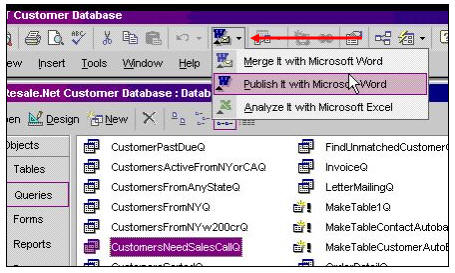
This class focuses on importing and exporting data. We'll learn about the different types of importing and exporting, and what it's used for. You will see how to export tables to another Access database, how to export query data to Microsoft Excel, and how to use the OfficeLink button to export data to both Excel and Word.
We don't stop there. That's just the easy stuff.

Next, we'll learn about comma delimited and fixed-width text files. How to create an import/export specification; how to create a macro to export text automatically using the TransferText action. We'll then learn about a similar TransferSpreadsheet macro action.


You will then learn how to import data from another Access database; how to append imported records to an existing table; how to link to tables in another database; how to link to an existing Excel spreadsheet; how to link to a Named Range in Excel; and how to link to a text file.


Finally, I'll show you a neat trick - how to take a name like "Joe Smith" and split it into two fields "Joe" and "Smith."


ACCESS 308

Lesson 1.
- Working with External Data
- ODBC (Open DataBase Connectivity)
- Importing & Exporting Data
- Linking v. Importing
- Examples

Lesson 2.
- Exporting to another Access database
- Creating a Blank Sales Rep database
- Exporting Customer Table
- Exporting to an Excel Spreadsheet file
- Creating a query to limit our data
- Exporting the query data to Excel
- Using the OfficeLink button
- Analyze It with Microsoft Excel
- Publish It with Microsoft Word

Lesson 3.
- EXport Text: Comma Delimited
- Export Text: Fixed Width
- Create EXport Specification
- Create a Macro to Export Text
- TransferText Action
- Create a Macro to Export to Excel
- TransferSpreadsheet Action

Lesson 4.
- Import From Another Database
- Appending Records To Existing Table
- Matching Field Names (Append Query)
- Creating Values For Unmatched Fields
- Import From an Excel Spreadsheet
- Import Wizard

Lesson 5.
- Importing Delimited Text File
- Importing Fixed Width Text File
- Fields That Are Directly Adjacent
- Linking To Tables in Another Database
- Linking To A Spreadsheet
- Linking To A Named Range in Excel
- Linking To A Text File

Lesson 6.
- Splitting Single Name Field into Two
- INSTR Function
- LEFT and RIGHT Functions
- LEN Function


Try a FREE Demo Lesson


Student Interaction: Microsoft Access 308

Richard on 1/1/2007:  External Data, Importing & Exporting Tables, from Excel, Text Files, Linking Tables, Spreadsheets, Splitting Names
Shirley on 4/24/2008: Export to a user-specified location: Access 308 is a great tutorial for automating the export of data to a txt or alternate file, however, it only provides the ability to export to a statically specified file. Is there a way to have Access export to a location that is specified on a field on another form. I have been playing around with this, both in vba and macros and can't get it to work. For example, if the form that also contains the button for executing the macro or vba code also had an unbound field that the user could specify the location and file name to export to, I would like to reference that field as the file location. I have tired just about every syntax I can think of and can't get it to work. This would allow the user to save the file in any location or file name. Also, by doing this, I could set it up so that the user could use the file browser to specify the location. Thanks for your advice and I love your tutorials.
Richard Rost on 4/24/2008: Shirley, EXCELLENT question.

Yes, it is possible to have the user specify the filename for the export. There are two EASY ways to do it. The first is to simply place a textbox on the form where your export button is, and have the filename in that.

Let's say that you create a textbox called ExportFilename on your SecondaryMenuF form right below your button. Now, in the FILENAME parameter for the macro that performs the export, just put:

=[Forms]![SecondaryMenuF]![ExportFilename]

We learned about this technique in Access 202, lesson 2, where we shared values between two forms. You can use this same notation in macros, queries, VBA code, etc.

The other way you could do it, would be to use the InputBox command to prompt the user for the filename when the macro runs. Here's the syntax:

=InputBox(Prompt,WindowTitle,DefaultValue)

So in this case, you would say:

=InputBox("Export Filename","Export","C:\ExportFile.xls")

And that would prompt the user for the filename, giving them a default vallue of C:\ExportFile.xls. We learned about InputBox in Access 306.

There is another way you could do it... but that would involve introducing the FILE and FOLDER controls to your database. I personally don't like pulling in extra controls into my database unless absolutely necessary, but Microsoft does make nice controls that you can browse for files and folders with. I cover them in my Visual Basic 106 class, and the same controls work in Access too.

You're still going to have to refer to the filename you select in your macro though - so you'll still need the Forms!FormName!Field notation.

ibad on 1/20/2009: i have form in this form i subform1 and subform2 if i click subform1 the related value in subform2 should be shown . it can be done with requrey but i need mdb file with example
Richard Rost on 1/21/2009: Ibad, you need to link the child and master properties correctly in the subform, and everything should work automatically. I cover this in Access 202.
Marina  Stein on 3/25/2009: Hi Richard,
I just ordered Access 3008 course. I really need workbook for this class. Please let me know why don't I see this book in your file.
Thank you, Marina

Richard Rost on 4/1/2009: Marina, I don't have handbooks available for ALL of my classes. It's based mostly on demand. If I don't sell a lot of handbooks for Access 307, I won't bother writing one for 308. If anyone else is interested in an Access 308 handbook, please post a note here and I'll consider it. Thanks.
 

You may want to read these articles from the 599CD News:


Learn
 
Microsoft Access
Microsoft Excel
Microsoft Word
Microsoft Windows
Microsoft PowerPoint
Adobe Photoshop
Visual Basic
Active Server Pages
Online Seminars
More...
Customers
 
Account Login
Online Theater
Downloads
Lost Password
WalkThru Tutorials
Free Upgrades
Insider Circle
Info
 
Latest News
New Releases
User Forums
Tips & Tricks
Search Our Site
Waiting List
Production Schedule
Help
 
Live Chat
Customer Support
Troubleshooting
FAQs
TechHelp
Consulting Services
About Us
 
Background
Testimonials
Jobs
Affiliate Program
Richard Rost
Order
 
Video Tutorials
Handbooks
MYOLP Memberships
Idiot's Guide to Excel
Volume Discounts
Payment Info
Shipping
Terms of Sale
Contact
 
Live Chat
General Contact Info
Support Policy
Contact Form
Email Us
Mailing Address
Phone Number
Fax Number
Course Survey
Try Us
 
Free Lessons
Online Theater
Mailing List
Course Indexes:   Microsoft Access   Microsoft Excel   Microsoft Word   Microsoft PowerPoint   Visual Basic (VB)   Photoshop   Active Server Pages (ASP)  
Keyword Search Cloud:   What's This?   courses   microsoft access tutorials   vlookup   access   cartesian   excel   dlookup   vba   attendance   access 2007   sql   windows 7   combo box   pivot table   visual basic   test   iif   word   calendar   query   conditional formatting   pivot tables   photoshop   hlookup   access 101   excel 202   excel 2007   student attendance   update query   my account   word 2007   append query   quickbooks   queries   dsum   reports   powerpoint   if   microsoft access   dmax   mail merge   relationships   ms access   access 2010   vb   dcount   subforms   excel 2003   handbooks   html   599cd   combobox   if function   security   microsoft word   after update  
Copyright 2012 by 599CD.com, All Rights Reserved