|

Beware of the Vulcan greed for knowledge. -79th Rule of Acquisition |
|
||||
|
||||||||||||||||||||||||||||||||||||||||
|
|
||||||||||||||||||||||||||||||||||||||||
|
||||||||||||||||||||||||||||||||||||||||
|
|
||||||||||||||||||||||||||||||||||||||||
|
|
||||||||||||||||||||||||||||||||||||||||
|
VLOOKUP is a powerful function in Microsoft Excel that allows you to look
up a value from another spreadsheet - or a smaller subtable (lookup table). We
cover the VLOOKUP function in depth in our
Microsoft Excel 202 class.
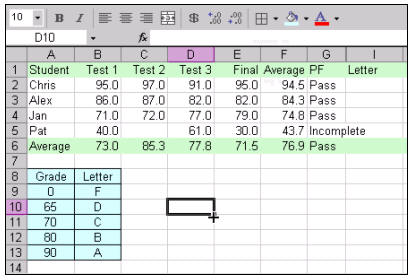
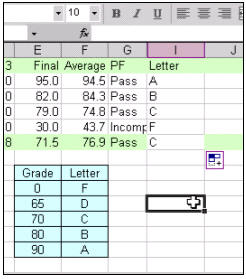
In our class, we begin by creating a simple gradebook for students. This gradebook has students' names and test grades. Our goal with VLOOKUP is to give them a letter grade by looking it up in the subtable. We'll create a subtable (A8:B13) which will have our grades in it. We'll turn this table into a Named Range (a concept we also cover in this class) called LookupGrades.
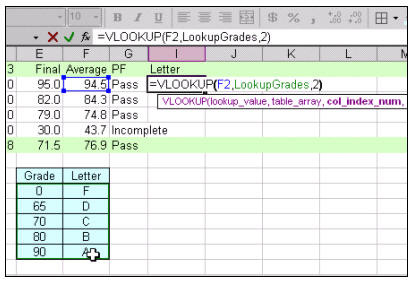
Next, we'll use the VLOOKUP function to look up their letter grade from the small subtable. In this particular case, the function would look like this: =VLOOKUP(F2,LookupGrades,2)
F2 is the value that we want to look up (the student's average). The LookupGrades range is defined as a named range - the address of the little table shown. Finally the "2" indicates that we want to return column "2" - or the second column of our little subtable. You can then see all of the student's grades once you AutoFill the formula down the column.
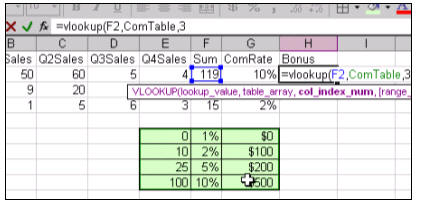
That's it. VLOOKUP is really a pretty easy function to use, once you know how. In class, we'll also cover some more examples of using VLOOKUP - like how to look up a commission rate and bonus payments for sales reps.
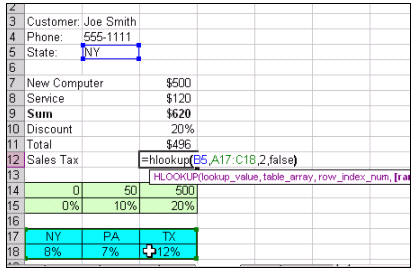
We'll also learn about HLOOKUP, which is the horizontal cousin of the VLOOKUP function. We'll use it to calculate a discount on a customer's invoice.
And, again, we cover this function completely in our Microsoft Excel 202 class. You will learn through step-by-step video tutorials how to use the VLOOKUP function in detail. The full cost of this course is only $10.99 for a full one-hour video lesson covering VLOOKUP, Named Ranges, Nested IF Functions, and so much more. Or, if you need more basic Excel training, we have beginner lessons starting as low as $5.99 for one-hour video tutorials. We have a FREE demo of this class available on our Free Demo Lessons Page.
|
||||||||||||||||||||||||||||||||||||||||
|
|
||||||||||||||||||||||||||||||||||||||||
|
||||||||||||||||||||||||||||||||||||||||
|
|
||||||||||||||||||||||||||||||||||||||||
|
||||||||||||||||||||||||||||||||||||||||
 These
are Full Motion Video Tutorials
with narration! Plus we have printable handbooks
available for all of our Microsoft Excel courses. The handbooks are an
excellent resource to follow along with as you're watching the videos -
or as a reference guide after you're finished with the class.
Click here to learn more about our
handbooks! These
are Full Motion Video Tutorials
with narration! Plus we have printable handbooks
available for all of our Microsoft Excel courses. The handbooks are an
excellent resource to follow along with as you're watching the videos -
or as a reference guide after you're finished with the class.
Click here to learn more about our
handbooks! |
||||||||||||||||||||||||||||||||||||||||
|
No Matter What Your Skill Level... You Will Learn Something From Our Courses!
|
||||||||||||||||||||||||||||||||||||||||
|
With 599CD, you are learning from one of the best! Our instructor, Richard Rost, has been working with Microsoft Excel since the very first version was released. He was a self-employed contract software developer for more than a decade. Richard taught Microsoft Excel in the classroom starting in 1994, and has developed all of his own training materials. Our 599CD Microsoft Excel tutorials are the culmination of years of Richard's practical experience as a developer, and as a teacher. You will learn how to build spreadsheets the way they should be. You will learn practical, real-life examples taught by a developer - not just some part-time computer instructor following an outline or some off-the-shelf book. These are real spreadsheet examples for real projects. You will build workbooks from the ground up.
You will be learning how to work with Excel almost as if you were sitting down, one-on-one with Richard. Simply watch him do the example on your screen, then pause the video and do it yourself. Didn't quite get it? Just rewind the video and watch it again. We even have full-color printed manuals available that you can use to follow along with - or refer back to later after class. It's almost like being in a real class - but you can go at your own pace. And, if you have questions, you can always post them in our Microsoft Excel User Forum, and either Richard or one of our other instructors - or maybe even our other students - will try to help you.
We can help! It's no surprise... you will get more done and you will feel much better about your work once you know how to properly use Microsoft Excel. Take the time to learn! Think of it this way: if our courses can save you just ten minutes a day of not fumbling through tech manuals or online help systems, we've just saved you an entire week of work by the end of the year.
Don't Just Take
How does it work?
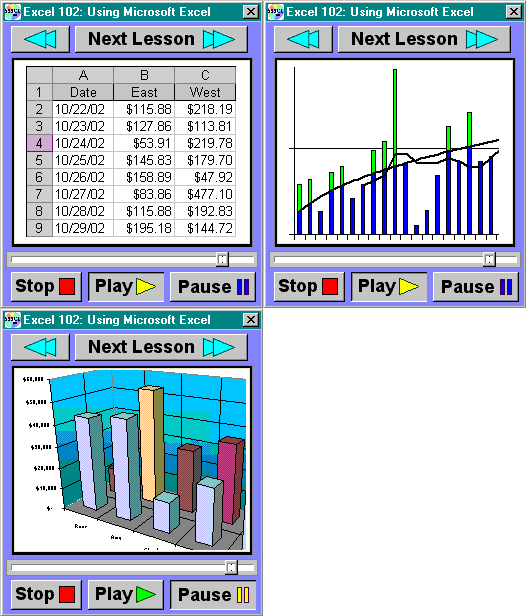
Our courses are all on-screen lessons with audio and
full-motion video. You watch the lesson play in a small window right on
your computer screen, and you follow along with the examples. You can stop,
pause, rewind, and jump to any spot in the course, just like watching a DVD
movie. You watch the instructor perform a simple, step-by-step procedure,
and then you follow along at your own pace.
|
||||||||||||||||||||||||||||||||||||||||
|
|
||||||||||||||||||||||||||||||||||||||||
|
||||||||||||||||||||||||||||||||||||||||
|
|
||||||||||||||||||||||||||||||||||||||||
|
||||||||||||||||||||||||||||||||||||||||
|
|
||||||||||||||||||||||||||||||||||||||||
|
Not Quite Convinced Yet? |
||||||||||||||||||||||||||||||||||||||||
|
That's OK. I know that there are a lot of too good to be true offers on the Internet. It's hard to imagine that a company would be selling a complete hour-long video tutorial on Excel for less than six dollars. You're probably thinking that there's some kind of a catch or other scam going on here. There's no catch. No scam. Nothing more to buy. Our company philosophy is very simple: give the customer a good product at a great price, and they'll come back for more. It's very simple... if we can get you to try our Excel 101 course for only $5.99, we hope you'll come back for Excel 102, and then 103, and so on. Sure, we're in business to make money... but we know the best way to do that is to build a loyal customer base that will come back and buy more courses. Now, if you're still in doubt as to whether or not this type of training is for you, then let me suggest that you sign up for one of our FREE demo lessons. We have a whole long list of free demo lessons available right here on our web site. All you have to do is sign up on our Free Online Demo Page. Just give us your name and email address and we'll send you an email with a special code to try one of our lessons online for free. Don't worry - your email address is safe with us (we never send out spam or give out email addresses to other parties). Think of this as our way of letting you try one of our lessons for free with absolutely no obligation! If you like the sample lesson, we hope you'll come back and place your order for Excel 101, or our full Excel Combo Package.
|
||||||||||||||||||||||||||||||||||||||||
|
||||||||||||||||||||||||||||||||||||||||
|
|
||||||||||||||||||||||||||||||||||||||||


 In
In